


For most developers, cross-browser testing is standard practice to ensure sites reach as many users as possible. But what about language translation? No matter which language you speak, foreign languages are spoken by over 60% of internet users. If a browser had a 60% market share, would you support it?
 Of course, your visitors can use third party tools like Google Translate or Babelfish to translate your site themselves, but you should never rely on users to do anything. Laziness is king on the internet, so always make things as easy as possible. Think how social media icons increase traffic even though users have browser bars and bookmarklets that they can use.
Fortunately, you don’t have to hire a professional translator to support multiple languages on your site. Thanks to wonderful APIs such as the Google Language API, there are a number of free and easy-to-install translation solutions available. Although these automatic methods will never be as good professional translations written by translators, they provide an attractive opportunity to offer internationalization at no cost.
Google Translate Tools
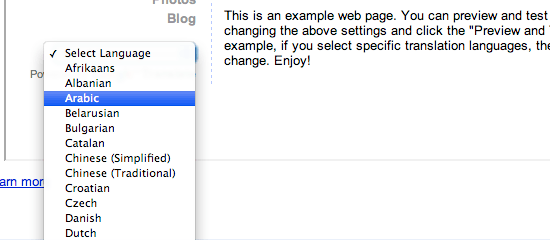 First, Google Translate provides a simple widget that you can copy and paste onto your site for a basic dropdown of 52 languages. When a language is clicked, the user is redirected to translate.google.com to see the translation. While this widget is easy to install, it’s a bit “old web” with its unstyled dropdown and ugly branded button.
However, a larger issue is that it boots users to Google for the actual translation, so you lose any linkbacks or tracking data.
The TranslateThis Button
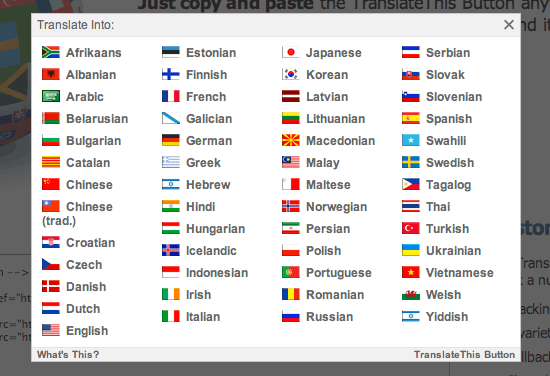 An alternative to Google Translate Tools, The TranslateThis Button is another translation widget that can be copied and pasted onto any webpage. Leveraging the Google Language API, it provides the same 52 languages of translation as Google Translate Tools, but with a better user interface including dropdowns, overlays, and flag icons.
Most importantly, users are not redirected to Google. The translation runs in JavaScript, replacing portions of the page as it receives them from Google. In addition to producing a nice transition effect, JavaScript allows the script to work significantly faster than Google Translate for most pages.
Additionally, the TranslateThis Button provides some customizable options: Google Analytics tracking, customization options for the look and feel, callback functions, and a scope restriction. Read the docs for more info. Overall, the TranslateThis Button is advantageous because it provides a rich user experience while staying relatively lightweight (the script is under 12kb). Running on the client-side allows it to translate most websites quickly, however sites with a great deal of content might benefit from a server side script with static caching features.
jQuery Translate Plugin
 Another client-side translation option is the jQuery Translate Plugin. Similar to the TranslateThis Button, this script parses the page content and sends it to the Google Language API using JavaScript. Instead of building an interface for accessing the languages, this plugin provides a couple of handy translation functions you can use however you like.
The jQuery Translate Plugin has certain advantages and does a great job concatenating short pieces of content to limit requests to the Google Language API. However, it still tends to run slower than the TranslateThis Button since these requests run consecutively. Additionally, even without the jQuery core, this script is the same file size as TranslateThis.
Global Translator (WordPress)
 Client-side translation can be fast, sleek and easy to implement. However, for high traffic websites, you can’t beat a server-side solution with caching. Global Translator by Davide Pozza is a WordPress plugin that does just that.
Providing 41 languages of translation for any WordPress site, its features include a fast-caching system and SEO-friendly permalinks. No client-side method can boast all that, and what’s more, this plugin allows you to choose from four different translation engines: Google Translate, Babel Fish, Promt or FreeTranslations. If you have a WordPress site, Global Translator is definitely the way to go.
It is significantly better than the Google AJAX Translation plugin, which just leverages the jQuery Translate Plugin.
Where is translation headed?
Automatic online translation has made some amazing progress recently and is just getting better. The number of languages supported by the Google Language API is constantly increasing, allowing you to reach a growing user base.
Also, the quality of the translations and speed of the API are steadily improving. In the future, Google will hopefully increase the length of the language strings that can be passed to the API. The max is currently 1,000 and if it were increased to 2,000, a number of Translation plugins could run significantly faster.
Additionally, Google Translate recently announced Text to Speech support, and Weston Ruter released a script that combines this with HTML5 audio. As the web moves towards a fuller internet experience, accessibility issues are coming to the forefront. Translation should not be forgotten in this process.
Related Content
-
 President of WebFX. Bill has over 25 years of experience in the Internet marketing industry specializing in SEO, UX, information architecture, marketing automation and more. William’s background in scientific computing and education from Shippensburg and MIT provided the foundation for MarketingCloudFX and other key research and development projects at WebFX.
 -

WebFX is a full-service marketing agency with 1,100+ client reviews and a 4.9-star rating on Clutch! Find out how our expert team and revenue-accelerating tech can drive results for you! Learn more
Make estimating web design costs easy
Website design costs can be tricky to nail down. Get an instant estimate for a custom web design with our free website design cost calculator!
Try Our Free Web Design Cost Calculator
Share this article




Web Design Calculator
Use our free tool to get a free, instant quote in under 60 seconds.
View Web Design CalculatorMake estimating web design costs easy
Website design costs can be tricky to nail down. Get an instant estimate for a custom web design with our free website design cost calculator!
Try Our Free Web Design Cost Calculator



