


The Best Firefox Add-ons for Web Designers
Mozilla Firefox is a very popular browser, especially among web designers and developers. These days, with such a crowded field, staying at the top of the browser heap takes a lot of work. One of the factors that make Firefox so well-liked is the huge library of great extensions that enhance your browsing experience.
Among the massive list of add-ons, many are vital to web designers and developers. If used, it will make your workflow quicker and more productive. Let’s look at our top 20 essential Firefox extensions for web designers.
1. Web Developer
 The Web Developer Firefox extension for web designers extends Mozilla Firefox by adding a toolbar with various options for working with web pages. For example, it has an option to inspect CSS styles of page elements that will tell you what CSS attributes they have, and which styles affect them.
2. SeoQuake
 As one of the best Firefox addons for web designers, SeoQuake will help you in optimizing your web pages for search engines. It gives you an SeoBar that has loads of useful SEO-related options for you to take advantage of. This extension will assist you in identifying issues pertaining to search engine indexing in your web pages.
3. Window Resizer 1.0
 Window Resizer comes in handy for testing different screen sizes and monitors resolutions. It quickly and accurately resizes Firefox’s viewport so that you can test to see how your design looks in standard resolution sizes.
4. FireShot
 FireShot is a Firefox add-on for web designers that creates screenshots of your web page. What is unique about this plugin is that it gives you a set of editing and annotation tools for working with your screenshots. This can be a handy extension to have for presenting your work in your portfolio.
5. Firebug
 Firebug is considered to be the ultimate developer’s tool for Firefox. You are given a ton of web development tools to use from within your browser. You can explore, edit, debug, and monitor CSS, HTML, and JavaScript in real-time on any web page.
6. Greasemonkey
 The Greasemonkey Firefox add-on enables you to modify how a web page looks and works by using small snippets of JavaScript. There are hundreds of scripts that you can download to enhance this add-on.
7. ColorZilla
 ColorZilla is an incredibly simple extension for Firefox. If you’ve ever wanted to determine what colors are used on a web page, ColorZilla is the tool for the job. It adds an eyedropper icon to the bottom-left corner of Firefox.
8. FireFTP
 FireFTP is a streamlined Firefox extension for uploading files to a server. It offers several advantages to standalone FTP applications, such as its operating system-independent requirements. This browser add-on has all the features you would expect from standalone apps.
9. IE Tab
 This great add-on for web developers allows you to switch back and forth from IE and Firefox layout engines with a click of a button. This permits you to test and compare how each browser renders your web pages without having to leave Firefox or install IE(vil).
10. Palette Grabber
 This add-on will build color themes that are exportable to popular graphic-editing software such as Photoshop, Paint Shop Pro, GIMP, Fireworks, and Paint.NET of the web page you’re currently viewing.
11. Font Finder 0.5c
 With this Firefox add-on for web developers, you can highlight any text on a page to find out CSS styling information about that highlighted block of text.
12. Total Validator
 This Firefox extension for web developers is an all-in-one validation tool that will check HTML, links, take screenshots and do a lot more. It also performs accessibility validation (WCAG, US-508), broken link checking, spell checking (in five different languages), and take screen captures via different web browsers and operating systems to see how your web pages look.
13. Platypus
 Hands down, Platypus is one of the best Firefox extensions for modifying a web page. It works with Greasemonkey as a sort of WYSIWYG and it will remember your edits when you visit the web page again. You can use it to experiment with different variations of a web design.
14. Dummy Lipsum
 An add-on with a very simple purpose, Dummy Lipsum generates Lorem Ipsum dummy text for you to use in your designs.
15. Page Diff
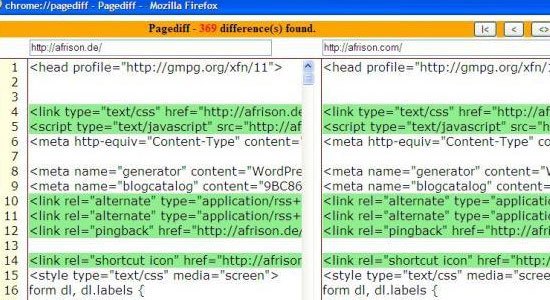 Page Diff is an add-on that helps web developers and designers see HTML source code differences between web pages. This is helpful for finding code irregularities or differences that will enable you to debug rendering issues.
16. Aardvark
 Aardvark, aimed at front-end web developers, let’s you select web page elements and gives you several options for them, such as removing them from the web page (great for screen shots) or modifying their colors (helpful when printing web pages).
17. Codetch
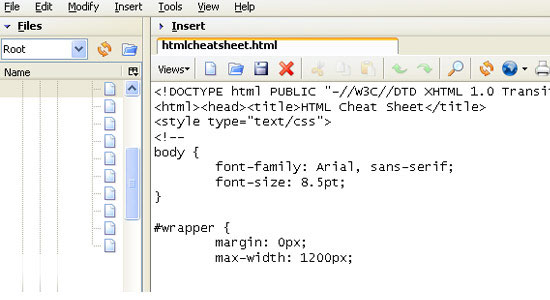 Codetch is a WYSIWYG editor add-on that allows you to edit web pages directly in Firefox. The interface is modeled after Dreamweaver (but thankfully, the price is not).
18. Measure It
 Measure It is an add-on that gives you a built-in ruler for measuring web page elements. It’s great for figuring out dimensions of things on a web page.
19. YSlow
 YSlow is a web browser utility that benchmarks a web page’s front-end design performance. It will assist you in optimizing your web designs for fast response times by identifying performance issues.
20. CSSViewer
 CSSViewer allows you to inspect CSS properties on a web page that you’re viewing. It’s a great way to study styles that you’ve seen on websites to learn CSS development techniques.
What Firefox Addons for web designers do you use?
Why do you use them?
Join us in the comments! *Co-authored by Jacob Gube
Related Content
-
 President of WebFX. Bill has over 25 years of experience in the Internet marketing industry specializing in SEO, UX, information architecture, marketing automation and more. William’s background in scientific computing and education from Shippensburg and MIT provided the foundation for MarketingCloudFX and other key research and development projects at WebFX.
 -

WebFX is a full-service marketing agency with 1,100+ client reviews and a 4.9-star rating on Clutch! Find out how our expert team and revenue-accelerating tech can drive results for you! Learn more
Make estimating web design costs easy
Website design costs can be tricky to nail down. Get an instant estimate for a custom web design with our free website design cost calculator!
Try Our Free Web Design Cost Calculator
Share this article




Web Design Calculator
Use our free tool to get a free, instant quote in under 60 seconds.
View Web Design CalculatorMake estimating web design costs easy
Website design costs can be tricky to nail down. Get an instant estimate for a custom web design with our free website design cost calculator!
Try Our Free Web Design Cost Calculator



