Ultimate Guide to the New Facebook Page Design
Recently, Facebook rolled out a major overhaul of their Pages. We studied the new design extensively to see what was new and improved. In this guide, we will go through the Facebook page changes and their impact, from a design, usability and web development perspective.
Design Changes
Let’s go over some of the major design changes to the new Facebook Pages.
No More "Standard" Tabs

The standard tabs that we’re used to seeing in the top area are now gone. They’re accessible on the left hand side, under the profile picture. The brand page designs and interface is now in sync with the personal user profiles where tabs are accessible under the user’s profile photo.
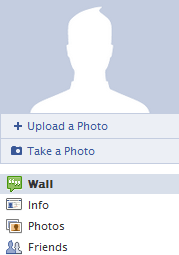
Note: the new tabs will appear in the form of a list (there will be a maximum of 6 above the fold).
New Photo Strip
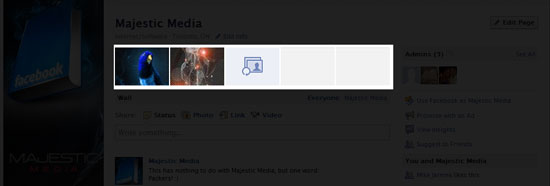
Like the new Facebook profiles, the new pages will have a Photo strip above the Wall (with the most recent photos you posted or tagged). When another brand or individual tags your company in a photo, that photo will appear in this section, giving your brand less control of the images shown. The downside: It’s now more essential to have someone monitor your Facebook Page regularly for inappropriate photos of your brand.
Profile Picture
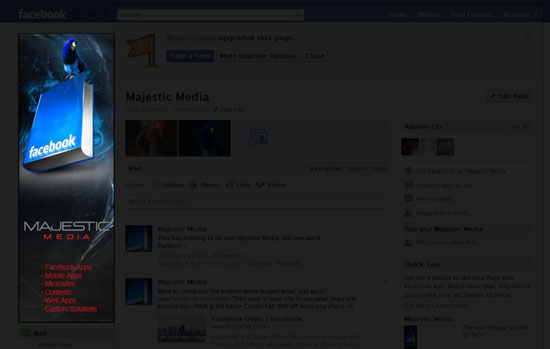
The maximum size for the profile picture has been reduced from 200x600px to 180x540px.
User Interface Changes
Here are some functionality and interface changes on the new Facebook Pages.
Admin View of Wall (See Hidden Posts)
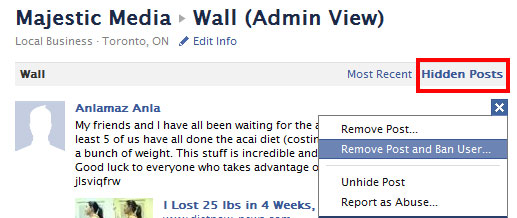
Users can now select the "Admin View" option (below the profile photo) and view Hidden Posts. In the example above, someone had spammed our wall with a magical diet post, which we then hid (we were also able to ban the user). To do this, on your own Wall, click the "X" at the top right corner of any post and select the option from the drop down that comes up.
Post as Your Brand
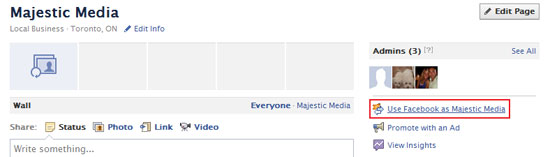
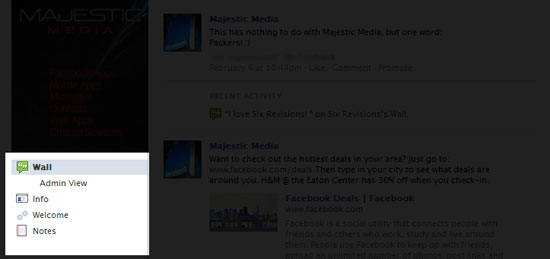
With this new powerful feature, you can now post on other Facebook Pages using your company’s Facebook Page. On the right-hand side, you’ll see a link that says, Use Facebook as [your brand name]. Click on that to start using this feature. You’ll then get this modal window:
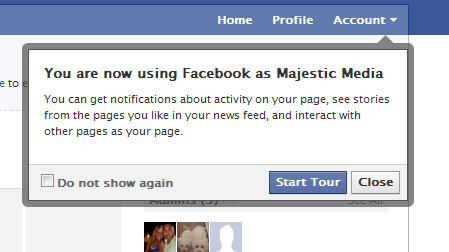
Here’s an example of a wall post made by the Majestic Media Facebook Page on the Six Revisions Facebook Page Wall:
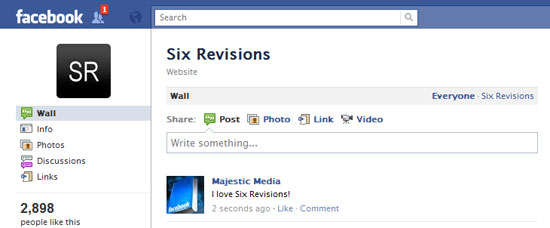
This can be beneficial in driving traffic to your Facebook Page, but be careful not to abuse this, as the other Facebook Page moderators can block your post and ban you from their wall (and we assume that if that happens enough times, your Facebook Page might be closed down by Facebook). Keep conversations meaningful!
Your Brand Can "Like" Other Pages

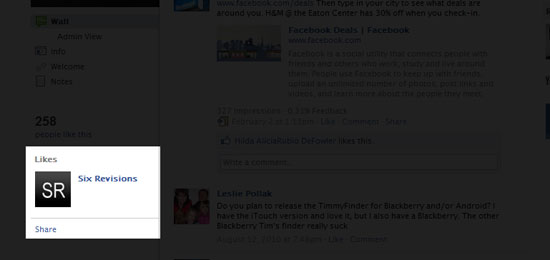
You’ll notice, in the screenshot above, that your Facebook Page can "Like" other pages.
Note: your Likes will show up in your Facebook Page, and when you go to your home page (while logged in), your newsfeed will populate with feeds from the brands you’ve Liked.
Fans Count Has Changed
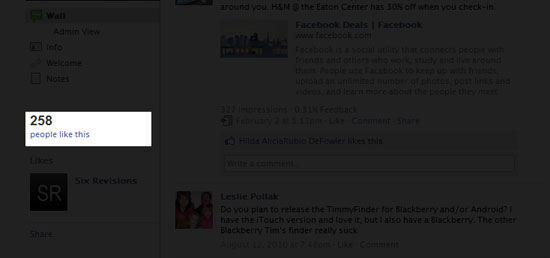
If you’re an admin of the Facebook Page, you’ll be able to click and see the names of the people who "Like" the page. From what we can tell, it’s in order from most recent "Likes". That is to say, the first person that shows up on that list was the last person to click "Like" on your Page.
The most important change that we see is that non-admin users will not be able to view the username/profile of those who "Like" that particular brand. This functionality will only be made available to the administrators of the Page.
Categories
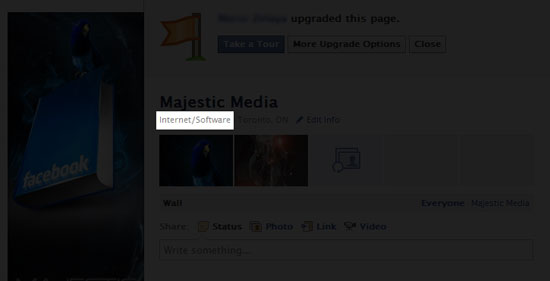
Now displayed on Facebook Pages is your organization’s category (which can be adjusted). We recently changed ours from "Local Business" to "Internet/Software".
Development Changes
Let’s look at some web development/web technology related changes to Facebook Pages.
Facebook iframes Now on Tabs
From a web developer’s standpoint, this is the biggest and best change Facebook has rolled out. What does this mean? No more Facebook Markup Language (FBML)!
Any Facebook app developer will tell you about the challenges of using and learning FBML. It’s limited, choppy and doesn’t allow you to build those fully customized Facebook applications within a Facebook Page tab.
Functionality is limited in the Facebook Page tab because of FBML, which usually means anything robust will have to be developed as a full-blown Facebook application.
The most recent example is the one we created for HomeSense (that we couldn’t previously do on a Page tab). During the planning phases, we were hoping to rollout this app within a Page tab, but Facebook had delayed their iframe rollout from Q4 2010 to Q1 2011, so this type of app wasn’t possible within the Facebook Page. Today, it can easily be implemented thanks to the iframe rollout.
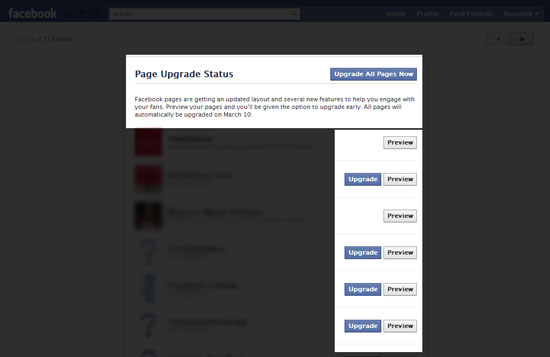
To use iframes, you need the most up-to-date layout. First and foremost: in order to use iframes, the page must be using the new Facebook Page layout. If you’re an admin of a Facebook Page, you can check the status of your page. It’ll look something like this:
Custom HTML and JavaScript
We conducted tests and found that HTML and JavaScript work flawlessly without restrictions on the iframes. More specifically, we were able to confirm that jQuery works perfectly as well.
However, we noticed some issues in the iframe display.
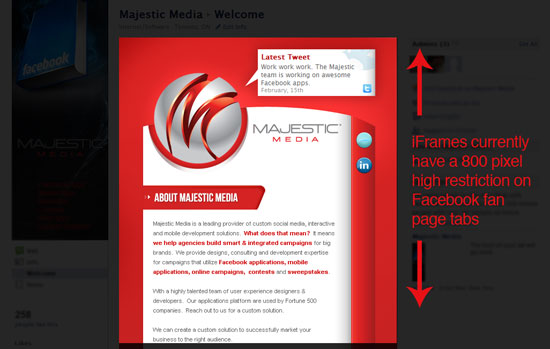
The iframe window height cannot be bigger than 800px. It seems that Facebook hard-coded this value (we viewed the Facebook HTML source code). When the iframe content is longer than 800px height, scrollbars show up in the iframe.
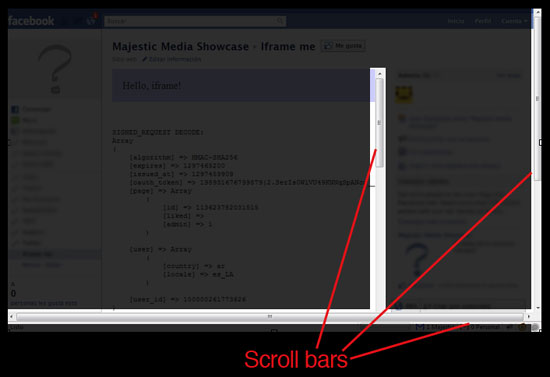
This also causes issues on some browsers, and adds another scrollbar on the main window (see below).
Facebook API for Facebook Pages
In the initial request parameters, they send us the following data:
- page id: to know the source page where the tab is installed
- locale: to know the viewing user language so we can show Spanish only or French only content to these users, rather than creating a new tab or making a bilingual tab
- country: to know the viewing user’s country
- Liked?: if the viewing user Liked the page; if not, we can show a "pre-like" conversion page encouraging them to hit the "Like" button to get access to page content
- Admin?: to know if the viewing user is an administrator of the Facebook Page
Saving User Sessions
This part is important if you’re running contests or creating applications that are user specific. In our initial research, we found that we can save sessions without any problems. So when the user enters the Page tab and authenticates itself, he/she can return (in the same browsing session) again and we will not need to authenticate. This is something we couldn’t do before using FBML.
Summary
What does all this mean to you as an account manager, digital account representative, freelancer or social media expert? Likely, fewer blank stares from clients and a greater overall sense of control over their brand on Facebook.
With the changes scheduled to take full effect March 10, 2011, you should now be ready to take full advantage of the changes.
Here’s the summary of changes:
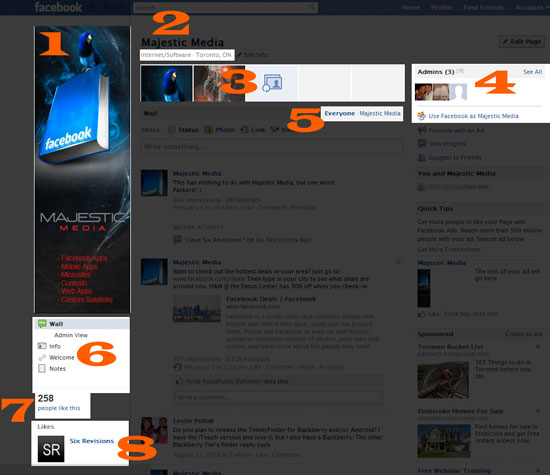
- Profile photo now has a max size of 180x540px.
- Display page category.
- Photo strip shows most recent tagged or posted photos. They are randomized. Watch out for inappropriate photos tagged with your Facebook Page. The dimensions of thumbnails are 96x67px.
- Admin view.
- Filter wall posts by your Facebook Page only or by everyone.
- Tabs are now on the left (under the profile photo) in the form of a list (maximum of 6 above the fold). Also, switch to Admin View to see hidden posts.
- If you’re an admin, you can view the people who have "Liked" your brand. We noticed it’s in order of most recent Likes. If you’re not an admin, you can no longer view those who have "Liked" the brand page.
- Your brand page can Like other pages. They’ll show up on your brand page.
Other changes not shown in the image above:
- You can see a Newsfeed of updates from Liked Pages on your home page when using Facebook under your Facebook Page name.
- Pages now support iframed tab applications.
- Email notifications when users post or comment.
Related Content
- Spying On Competition Using Social Media
- 10 Features That Will Make Twitter Better
- 10 Great Tips for Using Twitter as a Designer
- Related categories: Web Applications and Project Management
Mario Zelaya is the Managing & Exec. Creative Director at 
64 Comments
Tom Durkin
February 18th, 2011
Great article. I was quite worried about the power of my facebook page changing when they announced new designs were coming along, but most of the changes seem ok.
Love the fact you can now post on other pages under your page name. I think this will be great for publicity
Tom
Syed Balkhi
February 18th, 2011
Very very very good article Mario. This is why I love Sixrevisions. Keeping us up to date with awesomeness.
Posting as brands is a good thing, and a bad thing. Because we have noticed an increase in SPAM.
Simon Duck
February 18th, 2011
Thanks for the round-up of the changes, I’m currently going through my Facebook and trying to design something which gets the users interested in my brand. I’m looking forward to seeing how people utilise the changes.
Tim
February 18th, 2011
Nice post!
I noticed a new image gallery layout?
I don’t know if that’s new?
I use the Netherland version of Facebook.
The Z Man
February 18th, 2011
Very nice comprehensive guide. This is great information and useful information. Thank you for putting this together.
Vik
February 18th, 2011
Great stuff. Thanks
DarkprinceArmon
February 18th, 2011
This article has been very helpful. I am looking into ways of making my Facebook page viral. (like the page before you can view content) hopefully the new changes help support this.
Emiliano
February 18th, 2011
Excellent article Mario! I think that this Facebook Platform changes (specially the “Login as…” feature) will help brands to engage with users in a cleaner way. Also, we can do richer applications, allowing the user to interact with the brand in new fascinating ways.
Cheers,
Emiliano
Kim Brockie
February 18th, 2011
Thanks for the great article regarding the new Pages, useful info :)
Jamie Brightmore
February 18th, 2011
A useful guide to the recent changes, thanks.
One thing that really bugs me about the recent Facebook Page changes, is that you can no longer display your website address, along with a brief overview of your company/brand, like you could before in the panel on the left.
I am hoping they will allow you to add this important info to the space above the 5 images at the top, or at least on the left side again.
It is also quite annoying that the 5 images are randomly selected, not much room to be creative in the same way as you can with regular profiles. I would argue that it’s more important to grant Page admins creative freedom here, as the Page profiles are obviously more brand-centric.
Hugo
February 18th, 2011
You can change the iframe height by using facebook javascript sdk like this:
FB.Canvas.setSize({ height: 1200 })
Jo Denny
February 18th, 2011
OK, this really makes a lot of sense dude. Wow.
http://www.total-online-privacy.us.tc
Gustavo
February 18th, 2011
I haven’t even read all of this but BRAVO
Jeff Folger
February 18th, 2011
I manage a few FB pages and one of the newest things that is causing problems and you didn’t discuss is the random posting of users posts. On my New England Photography guild page users will tell me that they posted a New England photo and it might show up halfway down the page and be missed by many people who feel they’ve seen all the current posts.
While down the page the new posts are being missed.
I sent a bug report to FB on it since they, like Google don’t want the average user to be able to contact them. I can as an admin see the most recent and I think everybody needs to see this also..
Jeff Foliage
Andreas Hecht
February 18th, 2011
Good and helpful article -> bookmarked
kevin
February 18th, 2011
Very interesting post, i noticed that the site in itself does have problems switching from a profile to a page, just tested with Chrome 9 and Opera 10. Kind of freezes sometimes and even showing a blank page.
Josh
February 18th, 2011
Another huge issue with the new iframe tabs:
http://bugs.developers.facebook.net/show_bug.cgi?id=15228
You can also manipulate the height of the iframe with this JS SDK method:
http://developers.facebook.com/docs/reference/javascript/fb.canvas.setsize/
Mario Zelaya
February 18th, 2011
@Josh
You’re ABSOLUTELY RIGHT about those two links. Particularly: “Another huge issue with the new iframe tabs:
http://bugs.developers.facebook.net/show_bug.cgi?id=15228 ”
One of my developers noted that too and I completely forgot to include! I agree, that is a very very very big bug. I hope they resolve that one.
Thanks for sharing this: http://developers.facebook.com/docs/reference/javascript/fb.canvas.setsize/
Glad to see you’re well in the game Josh.
Let’s connect on Twitter:
@zelaya
@majesticmedia
Cheers,
-
Mario Zelaya, B.Comm, M.A
Managing & Exec. Creative Director
t: 1(888) 483-3331
f: 1(888) 331-3231
li: http://ca.linkedin.com/in/mariozelaya
tw: http://twitter.com/majesticmedia
fb: http://www.facebook.com/majesticmedia
w: http://www.majesticmedia.ca
a: Waterpark Business Center Downtown
20 Bay Street, 11th Floor,
Toronto, ON,
Canada, M5J 2N8
AUDIOMIND
February 18th, 2011
Removing the standard tabs that spanned near the top of the page was definitely a bad idea. Users are far less likely to click on links on the left. Further wall posts are not being displayed in chronological order any more, which makes a page’s wall basically senseless since posts are now scattered, unless you specifically make the wall default to the FB page’s post.
MissEm
February 18th, 2011
You can extend the height size of the iframe by using the FB.Canvas.setSize javascript function.
This will remove the scroll bars.
I use it for all of my iframe apps and fan page tabs:
http://developers.facebook.com/docs/reference/javascript/fb.canvas.setsize/
Anders Haig
February 18th, 2011
The 800px is just a default height and can be adjusted as Josh mentioned above however, an even better way is to use FB.Canvas.setAutoResize (you’ll need to set IFrame Size to Auto-resize in your application). No matter what your page size or if you have pages of different length in your tab, the iFrame will size appropriately.
In the article where you mentioned “It seems that Facebook hard-coded this value”, you were viewing the rendered HTML, not the code behind it. Additionally, in the next screenshot where you mention the extra horizontal scroll bar appearing on screen, it’s because the code in your iFrame actually extends that far (see oauth_token going off screen?). Just make sure to set the width of the page being viewed in the iFrame to 520px or less.
You should update that section of the article as neither of the two issues mentioned actually exists on the Facebook platform.
Aaron
February 18th, 2011
Terrific Post! I am really into social media right now (like everyone else out there!), especially Facebook fan pages, Facebook Marketing and FBML. It can be hard to keep up to date with such a fast changing innovative topic but I manage to do it through blog posts exactly like yours and bit.ly/hBxVuH. Tips and tricks rock. I am trying to learn as much as possible to put myself ahead of the curve. So thank you again!
Enjoy!
Aaron
Also, anyone out there thats looking for a FBML to iFrame, I found bit.ly/fAiICq which has a great converter.
anand patel
February 19th, 2011
different browser view in different but basic view are same…
i agree with kevin.
Rochelle Dancel
February 19th, 2011
Thank you for this very clear, very helpful breakdown of the new Facebook Pages!
Zdenek Hejl
February 19th, 2011
Excellent overview of Facebook Pages redesign. Thanks for that.
jsbls
February 19th, 2011
Hello, I wanted to know how to implement the new “pre-like” page to encourage users to like, because I used to do it with , which obviously doesn’t work anymore.. any help?
David Heriot
February 19th, 2011
Brilliant, thanks Mario. You need to check Homesense on Chrome though. Looks like the width is a tad too much and is getting pushed down the page.
Dibyendu
February 19th, 2011
Hi,
How do I get the Page Id using the Facebook app that I added to my Facebook page.
My code works with old pages, but with new layout pages, its not working.
Please help.
Thanks
Dibs
MissEm
February 19th, 2011
@Aaron,
I had a look at Lujure last week and I’m afraid it leaves alot to be desired.
The main killer – that you have to pay for a tab that you will never own. Once you leave the $29 per month on going subscription you can’t take the code with you, so you’d be back to square one and out of pocket somewhat!
The $29 subscription is for one fan page only and the tab has their advertisement down the bottom of the page that you can’t remove (unless you take the $195 per month subscription) or at l,east configure it to an affiliate link. I’m not a fan of entrapment marketing at all.
The options they allow are very limited and you can’t name the tab whatever you want to.
They have full control of that tab – and that’s bad in my mind.
I would not consider them as an option at all.
Jennier R
February 20th, 2011
I noticed that you must have your profile picture dimension exactly at 180x540px for Facebook to produce the max-size of it, otherwise, FB will resize it.
Usman
February 20th, 2011
I think using facebook as the brand name like Six Revisions may allow more exposure of the brand name but the user needs to be very careful in using facebook as spamming on other user’s wall will damage the reputation of the brand name
Umer
February 20th, 2011
Facebook is providing the Admins of the page with the option of upgrading their facebook fan page. The new facebook page will allow more exposure of a brand name through new tabs and categories feature
Julie K.
February 20th, 2011
Most of the changes in the new design are ok, but I really cannot get used to the new image viewer they’ve introduced recently, however there is a trick how to switch into the original one. Once your picture is loaded, you press F5 and your back on the original viewer. Thanks for the article.
katie moffat
February 21st, 2011
Great post. I have a query that’s been driving me crazy, if you have any idea I’d be very grateful! How do you change which tabs/apps appear on the left handside of a fan page? I have music player added as an application and I’ve uploaded music but I can’t see how you add it to the app list so that fans can see the app.
I note that you can only have a maximum of 6 tabs; I have less than this but still don’t seem to be able to add music player.
Lau Boyd
February 21st, 2011
great article :) thank you for sharing this information
Rochelle Dancel
February 21st, 2011
Does anyone know if it’s possible to friend someone as your fan page?
dich vu pg
February 21st, 2011
Good job ^^! test now hehe
Sandra
February 21st, 2011
Very useful article, thank you very much!
John in Oklahoma
February 22nd, 2011
Has anyone else seen that posts to a page’s wall are no longer displaying in reverse chronological sequence? The most current post should be at the top of the wall timeline, but it’s not always showing up there. Very troubling!
Bahadur
February 22nd, 2011
I wasn’t too pleased with all the changes and I actually liked the old view better. I wasn’t a big fan of Twitter or FaceBook for marketing anyways. They are merely there for brand awareness and doesn’t suit all businesses. Having a fan page on Facebook for instance, where comments are not responded to for weeks can do more harm than good to companies. Check out this blog post that discusses whether social media marketing is even worth it or not: http://blog.9thsphere.com/blog/social-media-marketing-worth-business-time
There have been case where social media did do more harm than good to some very big name companies.
Kat Fulton
February 22nd, 2011
Did anyone notice that if a fan leaves a comment, it does not show up at the top of the wall on a page necessarily? I got the best testimonial EVER of my DVD, and I’m so bummed that it showed up under some of my older wall posts… hm. Anyone know how to fix this?
Mike
February 23rd, 2011
I need some help with my Facebook Page. I can post (share) my status and photos just fine, but when I try to share a link nothing happens. Clicking the share button doesn’t do a darn thing. It’s as if I’m not even clicking it. Any ideas?
stefanie
February 23rd, 2011
Important feature that seems to have been overlooked here is that pages can now comment on other pages as well….
Christina Zimmer
February 24th, 2011
The summary is concise and to the point. I hate having to wade through the clutter in order to make sense of how this will impact my biz. Thanks – will keep you guys in mind for any consultation that we may need moving forward.
Jim
February 24th, 2011
This post was very helpful. I was going crazy trying to make the photo strip a cohesive image like you can do with profile pages. Good to know it’s randomized and not just me.
Moha
February 25th, 2011
There are a problem of size when you put an Iframe ( ex. invite friends ) in your application Iframe because i fixed the size of my application IFrame.
I want you do the same thing with the Iframe inside … How ?
Anna
February 25th, 2011
Thank you! Very useful information.
I am wondering if there is anyway we could bring back some of the old features? Specifically, I’d like to enable some of my page members faces to appear on the left bar like they used to. Long shot I know, but if anyone has an idea how to make this happen, it would be much appreciated. Thanks.
Preethi
February 26th, 2011
Impressive article mario..But i’m disappointed with the reduction of profile pic size.. :(
Kandice
March 3rd, 2011
Mario,
How exactly to do you this?
“Liked?: if the viewing user Liked the page; if not, we can show a “pre-like” conversion page encouraging them to hit the “Like” button to get access to page content”
Johanas Butler
March 13th, 2011
Why does the new Facebook Fanpage wall NOT display all the comments to users that are not logged in?
It just shows a refresh…. sign but loads no more wall posts.
This is not fair to brands that pay good money to advertise their Facebook fanpages. Wall feeds should be 100% public!
Kevin Warhus
April 8th, 2011
Amazing overview. Thanks so much for the breakdown. The new Facebook layout changes have provided some unique opportunities to do some really cool things with our business page, I just wasn’t sure how to do everything. This will definitely by bookmarked for future use. Thanks for sharing.
Lisa
May 27th, 2011
Why do some pages not show up when you are not logged into facebook but other facebook pages do?
ねこのありがとう。
July 26th, 2011
I was looking to make a variety of Facebook pages. Very helpful post would be helpful. Thank you.
Eric Marantan
August 25th, 2011
Hello, I like your post but I got a problem when I want to show my page status. When I am viewing the my page status, it says that “You are not an admin of any pages” what does it mean. I already login in my new pages and I also switch to that pages as admin.
I dont understand why I can’t use my page status. I just want to upgrade my page in to a new feature.
Anyone could help me guys.. Please beep me in my email or reply back a comment here.. Thank you!
Mona Wolters
September 24th, 2011
Every time I delete the old posts from my wall more old ones appear. How can I stop this?
Carolina Gonzalez
October 4th, 2011
Is there any ways to make readers like the page before they can comment? It used to be that way but the change well changed that :-/
Simon
October 9th, 2011
I am trying to create notes on my page instead of having to create a blog where old articles can be viewed. However I notice that my older notes are not appearing when I want them to. How do I solve this problem?
Kev
October 11th, 2011
Great Post, I really like the last part with the detailed picture and then the bullet points describing each number in detail.
Thanks a lot for this!
Drew
October 18th, 2011
Really like the information, but I am also looking for how the LIKE feature is working after the changes. As a developer, I do not see the Like button above my iframe any longer. Stuck like a bug in a rug!
. . . . . . . . . Drew
Zahiritbd
October 19th, 2011
Wow! ,this is nice, I like it.
Amanda larkin
October 21st, 2011
The has been very helpful.
Put still not sure how to link face book fan page to profile.
Lisa S
October 24th, 2011
Great article but I couldnt find an answer to my querie…. the content on my page seems visible to ALL users (not only those who have liked my page), some have even been able to make comments. I thought I had set it up so that the content was only visible once people liked my page, but I can’t find that option to change it anywhere now. Can you help?
Nell Dingler
October 31st, 2011
I think this is a good thing, I’m learning so much from Google & Facebook. I’m very glad to be able to remove post, GREAT !!
paul
November 29th, 2011
Great. So now I click on the photo section under my name and I don’t get any photos. Just an ad like box talking about getting friends. What a useless update. ALl I want is to see all my friends recent photos.
Leave a Comment