


 Let us assume that, just like everyone else, you are building a website–after all, the Web is where it is all happening now. As soon as your website goes live–and especially while you are still in the design and development phase–you need to make sure your site’s content will be found through search engines such as Google, Yahoo!, and Bing where many people go to look for information. Whether you’re starting a blog or deploying an e-commerce solution for your clients, it’s a good idea to keep in mind some good web development practices and SEO tips that will enhance your chances in search rankings.
This article follows up on a previous Six Revisions post called 9 Ways To Improve the SEO of Every Website You Design, sharing with you a few more tips for improving the search engine optimization, semantics, web accessibility, and interoperability of your web designs. Don’t forget, WebFX offers SEO services to clients in Miami, SEO help to clients in Philadelphia, and just about anywhere else you can imagine!
1. Use Flash Wisely
Don’t call me patronising–it goes without saying–but try not to use Flash when HTML/CSS should be used. Flash has its place on the Web: it’s great for interactive components such as sophisticated learning activity games with audio and video, and 3D animation. It’s better served as components of an HTML/CSS site than as the technology that powers the entire site.
For example, check out Kongregate, a popular social Flash gaming site. Although Flash is their bread and butter, they still use HTML, CSS, and server-side scripting to power their site functionalities.  Flash can be SEO-friendly and web accessible, however, it’s more difficult when compared to using open web languages like HTML, CSS, and JavaScript.
2. Use Gracefully-Degrading JavaScript for Hidden Content
If you are hiding and showing content on a web page, it’s best to use JavaScript so that the content is still within the web page’s markup. This is not only good for web robots such as search engines, but also great for those that use screen readers. 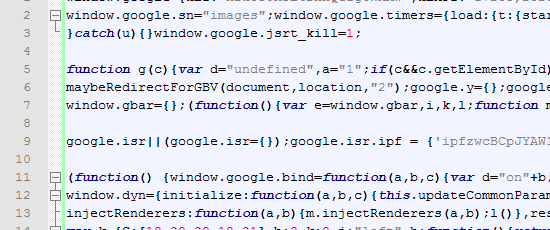 A good test to see whether hidden content on a web page is viewable by web crawlers is temporarily disabling JavaScript and determining if you can read your hidden content.
You can do this from within your browser settings, but more conveniently, you can use a browser plugin like Web Developer Toolbar.
3. Name Your Image File Names Accurately
It is easy to forget how important images can be for SEO and web design alike. Name the actual file correctly by giving it a key term (e.g. yellow-banana.jpg and not some random name like img2gtc92.jpg) because this gives your site assets extra context.
Make sure that you give the alt property of the image similar key terms and a decent and succinct description–aim to keep it 10 words or fewer. In addition, Google Images is another way to get traffic to your site, and if you name your image files well and give them excellent context through their alt property, you will improve your chances of showing up in Google Images results.
4. Don’t Drown Your Home Page with Links
Internal linking–hyperlinks that point to other web pages on your site–is important, so try not to have more than 150 links from page to page so that you don’t dilute your web pages’ rank.  Too many internal links can overcrowd the page and can also slow down your users’ ability to find the link they need.
5. Don’t Use Redundant Links
Some may think that increasing the value of a particular page involves repeatedly linking to the same page from another page. Search engines will only count the first instance of that link, so there is no need to repeat links. In addition, this is a poor practice that will confuse your users.
6. Deep Linking Can Improve Conversions
Deep linking are links that point to internal pages instead of the main/home page. It is a fantastic way for you to send power to pages deeper in your site outside of your home page. Deep linking also promotes the exploration of your site by visitors, providing additional points of conversions.
7. Have a Blog
Blogs are a great way to keep building fresh content on your site and targeting long-tailed key terms. A possible idea is to bring snippets of blog posts onto related pages for fresh content on these specific pages.
8. Make Your Brand Obvious
Make sure that your branding is very clear and that your brand name is obvious on your website. This makes for an easy way for people to remember who you are and augments the possibility of people searching for your brand name on search engines. Being searched by your brand’s name also means that you won’t compete with generic words that people often use in searches (i.e.
“budwieser” versus “american beer”).
9. Use an XML Sitemap
An XML Sitemap is a protocol that aids search engine crawlers gain contextual meaning about your site’s web page. 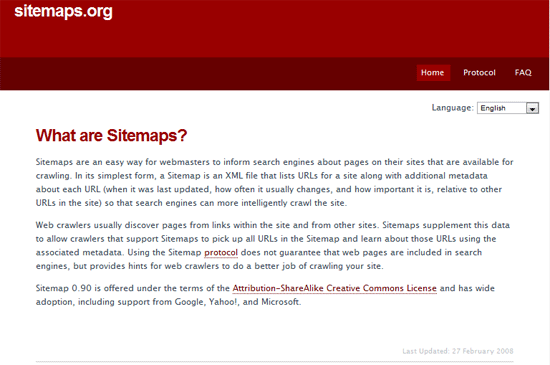 If you’re using a content management system, see if it has an XML Sitemap extension (or built-in feature) that will automatically generate the XML file for you. If not, you can use a tool like XML Sitemaps Generator.
10. Use Anchor Text Accurately for Deeper Pages
When linking through to your deeper pages, use your anchor text as precise and short pieces of information. It is important to use keywords that search engine bots can relate exactly to your page. For example, if you’re linking to a web page about Maldives holidays, your link should be <a href="/maldives-holidays.html">Maldives holidays</a>.
This way people, as well as web robots, easily know what they are going to get.
Related Content
- Make the Most Out of Social Media
- Optimizing WordPress for Search Engines
- 15 Tools for Monitoring a Website’s Popularity
- Related categories:Website Management and Content Strategy
-
 President of WebFX. Bill has over 25 years of experience in the Internet marketing industry specializing in SEO, UX, information architecture, marketing automation and more. William’s background in scientific computing and education from Shippensburg and MIT provided the foundation for MarketingCloudFX and other key research and development projects at WebFX.
 -

WebFX is a full-service marketing agency with 1,100+ client reviews and a 4.9-star rating on Clutch! Find out how our expert team and revenue-accelerating tech can drive results for you! Learn more
Make estimating web design costs easy
Website design costs can be tricky to nail down. Get an instant estimate for a custom web design with our free website design cost calculator!
Try Our Free Web Design Cost Calculator
Share this article




Web Design Calculator
Use our free tool to get a free, instant quote in under 60 seconds.
View Web Design CalculatorMake estimating web design costs easy
Website design costs can be tricky to nail down. Get an instant estimate for a custom web design with our free website design cost calculator!
Try Our Free Web Design Cost Calculator