


 Web analytics is a powerful tool made accessible to all of us through awesome free software such as Google Analytics. These tools are designed to satisfy the general needs of every kind of website out there. That’s why website analytics tools, in general, are very good at offering a fundamental overview of traffic data of a site, but not so good when it comes to answering specific questions.
To get specific questions answered, sometimes you have to work around limitations of your current software. As a proof of concept, I’ll present three examples/ideas for gathering more information in conjunction with Google Analytics. The purpose of this article is to present some starting points for your further exploration.
Example 1: Where Do Users Come From?
Google Analytics (and other web analytics tools) does a great job of telling you the last web page the user clicked on that got him/her to your website. This last web page is often called the referrer or referral path. Knowing where the user was before visiting your site is helpful because you can use this data to analyze and understand how people are getting to your site.
The problem, though, is that not all visitors become customers/users on their first visit to your website. In most circumstances, the majority of customers visit a website a few times before deciding to buy something or become a regular visitor. Taking action based only on the last referral path, as reported by tools like Google Analytics, might leave many opportunities on the table and might not give you enough actionable information.
Hacking Google Analytics to give you all the referrers of each visitor proves to be pretty difficult, and the reports you get still won’t answer all of your questions. Here is how you could do it better:
- Each time a visitor gets to your website, Google Analytics will look at his referral and note it down in a specific cookie called __utmz.
- A JavaScript hack can help you copy that referral information on another cookie that is managed by your website, and not by Google Analytics.
- Each time a visitor gets back to the website, Google Analytics will rewrite its own cookies. The JavaScript hack will update (not rewrite) your website cookie by adding the new referral next to the old one.
- When a visitor becomes a customer, upload the content of the new cookie to your database, next to your customer details.
Below is a sample of such a script. Feel free to experiment and fine-tune it.
function createCookie(name, value, days) { if(days) { var date = new Date(); date.setTime(date.getTime() + (days * 24 * 60 * 60 * 1000)); var expires = "; expires=" + date.toGMTString(); } else { var expires = ""; } document.cookie = name + "=" + value+expires + ";domain=" + window.location.hostname + "; path=/"; } function readCookie(name) { var nameEQ = name + "="; var ca = document.cookie.split(';'); for(var i = 0; i < ca.length; i++) { var c = ca[i]; while (c.charAt(0) == ' ') c = c.substring(1,c.length); if (c.indexOf(nameEQ) == 0) { return c.substring(nameEQ.length,c.length); } } return null; } function googleCookieReferrer() { var feed=readCookie("__utmz"); // If the utmcsr is not found, cancel if(feed.indexOf("utmcsr")==-1) { return null; } if(feed != null) { // New version cookie if(feed.indexOf("%7C") != -1) { feed = feed.split("%7C"); feed = feed[0].split("%3D"); } else { // Old version cookie feed = feed.split("|"); feed = feed[0].split("="); } if(feed[1] != "") { return feed[1]; } else { return ""; } } // Read the Google cookie, and extract the utmcsr parameter from utmz var referrer=googleCookieReferrer(); // If the Google cookie was successfully read, and utmcsr found if(referrer != null && referrer != "") { // Read our cookie if it exists if(readCookie("__rfrr")) { // Cookie data var feed = readCookie("__rfrr"); // Temp cookie string var feed_temp = feed; // This will hold the last referrer in our cookie var check = ""; // Split the data in our cookie feed = feed.split("|"); // If it's the first element, it's a string if(feed[feed.length-1] == null) { check = feed; } else { // If multiple elements, it's an array, so get last array item check = feed[feed.length-1]; } // If last element != referrer: write cookie and add new referrer if(check != referrer) { createCookie("__rfrr",feed_temp+"|"+referrer,365); } // If no cookie found: create and populate else { createCookie("__rfrr",referrer,365); } } }Once the script is in place, you’ll be able to answer the following questions:
- Who are the referrers that drive the most sales (no matter if it’s the first click, the last click, or somewhere in the middle)?
- Who are the best first-click referrers that bring converted visitors to the website?
- Which referrers do the best job of getting visitors back to the website and convincing them to buy?
Example 2: How Much Do Customers Spend?
The number one question I get from my clients who use Google Analytics ecommerce tracking is: Why are there more/less money or orders shown by Google Analytics than in reality? 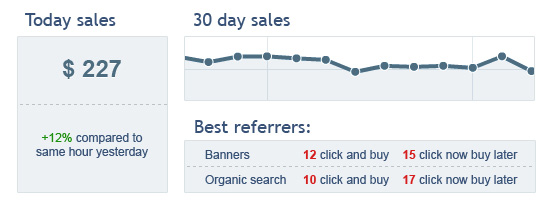 The answer: Google Analytics is not an accounting application, and it will almost never show exact figures of your sales. Charge backs, tracking code issues and ecommerce implementation not covering all payment methods are just a few reasons why the information provided by Google Analytics will not be precise.
Here is how you could do it better:
- In the admin area of the website, create a special page for reporting sales (if you don’t already have one). Report from your own database figures; include data such as daily sales, orders or average amount paid per order.
- Having in place the above JavaScript hack (example 1), add the referrers reports for your orders.
- Add some Google Analytics API queries and display behavior data of converted users compared to website average: time spent on site, number of pages, countries or anything else that’s important to your business (i.e., key performance indicators — otherwise known as KPIs).
You’ve just created a professional dashboard for your business that will give you a clear and reliable view on what’s happening.
Example 3: How Successful Is Website Personalization?
Personalizing the experience of your website visitors can bring positive results. For example, according to a Fast Company article, Yahoo!’s personalization algorithm was a key contributing factor to a 270% increase in clicks on the site’s home page compared to 2009. Here are just a couple of examples on what you could do to personalize experiences for your visitors:
- Display personalized messages and call-to-actions to your visitors, based on their referral path. You can start with specific messages for users that come from advertising campaigns by offering them exactly what they’re looking for based on the ad campaign they clicked on.
- Change your home page content based on previous behavior (make it an opt-in or opt-out action for your visitors when they sign up, to respect their privacy). Some more advanced coding might be needed, but it would be worth it.
- Invite engaged users to your website to subscribe to your newsletter (my company built an online app for this, called PadiAct) or RSS feed, based on their behavior.
Each website has many keywords that drive visitors from search engines on pages that aren’t immediately relevant for those keywords. With the next add-on to the previous hack, you can display a nice bottom overlay to your visitors that would contain just the information they are looking for. Now that’s good targeting!
// Add this to extend the code in Example 1 function googleCookieKeyword() { var feed = readCookie("__utmz"); // If the utmcsr is not found, cancel if(feed.indexOf("utmctr") == -1) { return null; } if(feed!=null) { // New version cookie if(feed.indexOf("%7C") != -1) { feed = feed.split("%7C"); feed = feed[3].split("%3D"); } else { // Old version cookie feed = feed.split("|"); feed = feed[3].split("="); } if(feed[1] != "") { return feed[1]; } else { return ""; } } else { return ""; } } // Read the Google cookie and extract the utmcsr parameter from utmz var referrer = googleCookieKeyword(); if (referrer == "YOUR_DESIRED_KEYWORD") { // Add your code for displaying the content you desire here }Conclusion
Actionable web analytics is not something that should be left to generic tools and data-gathering methods. You’d be happy to know that it’s also not something exclusively affordable only to large companies with big budgets. As long as we can do some basic coding — and as long as we are devoted to meeting the goals of our website — nothing can stop us from hacking our way to great solutions and innovative workarounds.
I hope this article has inspired you to look into how you can gather richer and more refined data from your own analytics software.
Related Content
-
 President of WebFX. Bill has over 25 years of experience in the Internet marketing industry specializing in SEO, UX, information architecture, marketing automation and more. William’s background in scientific computing and education from Shippensburg and MIT provided the foundation for MarketingCloudFX and other key research and development projects at WebFX.
 -

WebFX is a full-service marketing agency with 1,100+ client reviews and a 4.9-star rating on Clutch! Find out how our expert team and revenue-accelerating tech can drive results for you! Learn more
Make estimating web design costs easy
Website design costs can be tricky to nail down. Get an instant estimate for a custom web design with our free website design cost calculator!
Try Our Free Web Design Cost Calculator
Share this article




Web Design Calculator
Use our free tool to get a free, instant quote in under 60 seconds.
View Web Design CalculatorMake estimating web design costs easy
Website design costs can be tricky to nail down. Get an instant estimate for a custom web design with our free website design cost calculator!
Try Our Free Web Design Cost Calculator



