
10 Things Every Web Designer Just Starting Out Should Know
There are many aspects of creating a website design. Web designers often have to play multiple roles and be very knowledgeable about building effective and usable site layouts.

Most of the lessons you’ll learn in web design comes from work experience; learning is an iterative process and there is no better way to gain knowledge than to make mistakes (and then and learning from them).
In this article, we discuss 10 essential and general tips that every novice web designer should know.
1. Optimize Web Graphics for Better Page Load Times
Learn how to optimize your web graphics by selecting the proper format and making sure that it’s as small as it can possibly be. Even though people are advancing to broadband connections, there are still quite a few who use dial-up internet connections. Additionally, with the emergence of mobile device technologies that don’t necessarily have broadband-like speeds, having slow page load times due to image file sizes can turn users off.
Here a general rule of thumbs for picking the right file format: images that have solid colors are best saved as PNGs and GIFs, while images with continuous colors (such as photographs) are best saved as JPGs.
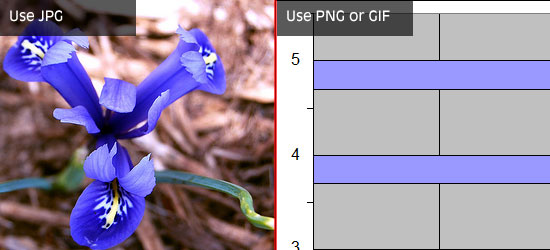
There are plenty of tools available at your disposal that will help you further optimize your images and lower their file sizes, check out this list of tools for optimizing your images.
By limiting the number of images you use to the bare minimum, being smart about using images, and reducing file sizes as best as you can, you will significantly cut down page response times of a web page and improve your web page performance.
2. Keep it Clean and Simple
A good web design is not just one that looks visually appealing, but also one that is user-friendly. A clean and simple web design typically ends up being a high-usability web design that is not confusing to interact with.
By having too many site features and components on a page, you risk the chance of distracting website viewers from the purpose of the website. Make sure each page element has a purpose and ask yourself the following questions:
- Does the design really need this?
- What does this element do and how does it help the user?
- If I remove this element all of a sudden, will most people want it back?
- How does this element tie into the goal, message, and purpose of the site?
Additionally, though it may be super awesome to come up with a new concept or interface design pattern for your website, make sure that the design is still accessible and intuitive to your users. People are accustomed to common interaction patterns, site features, and web interfaces – and if your design is truly unique, make sure it’s not too obscure and puzzling. Be creative, but also keep it simple.
3. Navigation is the Most Important Thing You Will Design
The most essential site feature is the website’s navigation — without it, users are stuck whatever page they happen to land on. With that obvious fact out of the way, we’ll talk about some important points to consider when constructing a navigation scheme.
First, it’s very important to put enough time and a lot of planning on a site’s navigation structure. This is common sense, but it’s still surprising how many web designs take site navigation for granted.
Placement, style, technology (will it use JavaScript or just CSS?), usability, and web accessibility are just some of the things you need to consider when creating the navigation design.
Your navigation design should work without CSS because of text-based browsers. Poke fun of text browsers all you want, but they are still prevalent in many mobile devices. Perhaps more importantly, navigation that works with CSS disabled is accessible (99.99% of the time) via screen readers.
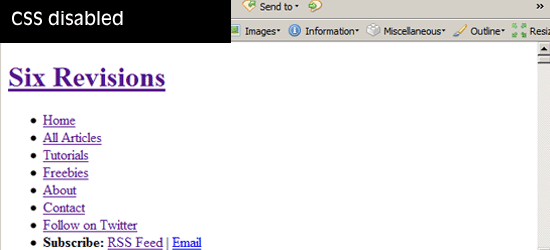
Navigation should be accessible and usable without the need for client-side technologies such as JavaScript or Flash, which users may not have enabled or installed for various reasons such as security or company policy.
It is imperative that you have a good navigation system in place that is located at a highly-visible location. A good navigation is detectable as soon as the web page loads without having to scroll down the web page. This is where keeping it clean and simple plays a major role: a complex and unconventional design can lead to user confusion.
Users must never wonder, even for a split second, "Where is the site navigation?"
For sites organized in a hierarchical, multi-level manner, make sure that it is easy to navigate from between parent and child web pages. In addition, it should be easy to reach top-level pages (such as the site’s front page) from any webpage.
The main goal of your site navigation is to allow users to get to their desired content with as few actions and with as little effort on their behalf as possible.
4. Use Fonts Wisely and Methodically
Though there are thousands of fonts out there, you can really only use a handful (at least until CSS3 is fully supported by major browsers). Make it a point to stick to web-safe fonts. If you don’t like web-safe fonts, consider a progressively-enhanced web design that leverages sIFR or Cufon.
Keep font usage consistent. Make sure that headings are visually-different from paragraph text. Use white space, tweak line-height, font-size, and letter-spacing properties to make content pleasant to read and effortlessly scannable.
Perhaps one of the things that web designers often get wrong is font-sizes. Because we want to fit as much text as we can in a web page, we sometimes set font sizes to uncomfortably small sizes. Try to keep font sizes at and above 12px if possible, especially for paragraph text. While many people face no difficulty reading small text sizes, think about older users and persons with low-vision and other types of vision impairment.
5. Understand Color Accessibility
After talking about fonts, we also need to point out the importance of using the right colors.
You need to consider color contrast of background and foreground colors for readability and for users with low-vision. For instance, black text on white background has a high-contrast, while orange text on red background will make you strain your eyes.
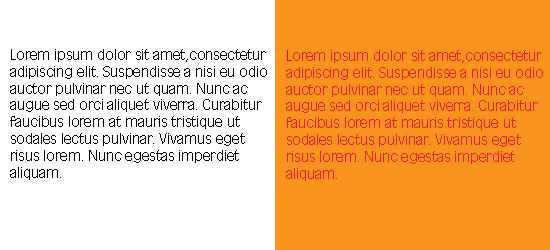
Also, use colors that are accessible to users with particular forms of color-blindness (check out a tool called Vischeck that will help you test for certain types of color-blindness).
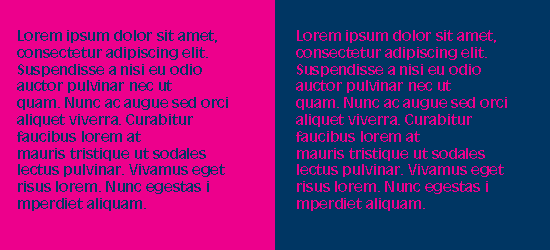
Some color combinations work well only when the color is used as a foreground color instead of a background color. Take for example, dark blue text on a pink background versus but pink text on blue background, same colors but different levels of readability and reading comfort. It is important not only to get a good color combination but also to apply it to the right elements on the page.
6. You Need to Know How to Write Code Yourself
With various WYSIWYG editors flooding the market, it has become as simple as 1-2-3 to design a site. However, most of these editors insert unnecessarily code junk, making your HTML structure poorly designed, harder to maintain and update, and causing your file sizes to bloat.
By writing the code yourself, you come out with clean, crisp, and terse code that’s a pleasure to read and maintain; code that you can be proud to call your own.
Knowing how to use a WYSIWYG or an IDE with a visual preview does not excuse you from learning HTML and CSS. You have to know what’s going on in order to create effective, semantic, and highly-optimized web designs.
7. Don’t Forget Search Engine Optimization
A good designer should always remember to keep the basics of SEO in mind when designing a site. For example, structuring web content so that important text are represented as headings (i.e. page title and logo). This is where learning how to code properly comes in handy. Knowing correct, semantic, and standards-based HTML/CSS – you will quickly realize that divs are better than tables for web layouts not only for accurate representation of site content, but also for search engine rankings; you will also know that CSS background text image replacement is a good idea.
8. Understand that People are Impatient
People on an average spend only a few seconds before deciding whether they want to read more or navigate away to another site. Therefore, you as a web designer have to device a way for encouraging users to choose the former option within those precious seconds.
Know that not many visitors will scroll down to view the entire contents of the page if what they see at the top does not interest them. Remember to keep your important elements on the top where they are easily visible, but also do not overcrowd the top half of the page which can intimidate users and turn them off from reading further down the page. Consider the top half of a web design a selling point: be a salesman, make people buy into the notion that they want to see what else is on your site.
9. Learn About (and Be Aware of) Browser Quirks
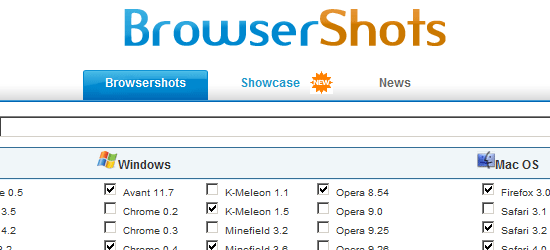
One of the things you must know as a web designer is that your work operates in a finicky and unpredictable environment: web browsers. It’s not enough that your designs work on a few web browsers, they need to work in as many browsing situations as you can possibly afford. Before production – test your prototypes using tools like Browsershots.
10. Make Designs that are Flexible and Maintainable
A good web designer makes sure that the site can easily be updated or modified in the future. Designing websites that are malleable and easy to maintain is a sign of a great web designer. Make your work as modular as possible by separating style from structure.
Know that our industry is dynamic and still young – things change in a very short amount of time. Keeping this thought in mind will promote the creation of flexible web designs.
What are your web design tips?
If you have more tips to share to beginning web designers – kindly share them in the comments.
Related content
- Why Designers Should Learn How to Code
- How to Design for Your Worst Client: You.
- How to Stay Ahead of the Curve as a Designer
- Related categories: Web Design and Web Development
John Urban is a sophmore at UCLA and currently majoring in computer science. He is a writer for an online magazine StyleCeo which deals with fashion. In his spare time, he enjoys sports, being with his girl, or just doing some freelance work. If you like his work on here and you’d like for him to work as a freelancer for you, you can 
68 Comments
Oliver Nassar
July 1st, 2009
Great write up/advice.
Of particular interested to me was “Navigation is the Most Important Thing You Will Design” and “Use Fonts Wisely and Methodically”.
The fonts available on most browsers is very limited (especially Windows based ones, without my favorite Lucida Grande). A trick that requires some upfront costs, but long term benefits, is photoshopped sprites for copy that needs to stand out.
eg. a sprite for your nav that has the tabs written in a downloadable font, which is then given two-four states (inactive, active, hover, focus).
It will be displayed consistently in every browser, and really make your nav look slick, clean and coherent.
Orca
July 1st, 2009
Nice Article
I think you forgot to put the –more– link in – as the full article is visible on the front page not just the intro text.
Mokho
July 1st, 2009
really good article and very useful for pll who wants to be a successful designers , keep rocking john
Sneh
July 1st, 2009
Awesome Read! Well done for this useful resource mate!
Anne
July 1st, 2009
This is a great post! Excellent advice, reminds me to pay more attention to accessibility issues as well.
Sneeky
July 1st, 2009
Point 3: Content is more important then the navigation for accassibility. So in accessible website its better to place the content above the navigation in the source
richard
July 1st, 2009
nice article, some very important points mentioned
Crowd
July 1st, 2009
Forwarding to 5-10 contacts of mine… :D
abriko
July 1st, 2009
Good résumé, i just read the titles because i have just finished to read the book “prioritizing web usability” and it talks about that and more.
Tyler
July 1st, 2009
I’m color blind – it makes designing very hard work. I often use various combinations of colours which I know work well together, and then asking my girlfriend if she could suggest colour improvements. Good tips though.
Phaoloo
July 1st, 2009
Awesome tips! They are ten things every designer should think about first when day set up a new web site.
Cesar Noel
July 1st, 2009
I agree with this list of yours. A lot of designers tend to forget optimizing the images which would tend to eat up the loading time.
Armig Esfahani
July 1st, 2009
very nice post.. my advice would be to always start designing by drawing a sketch on a paper and deciding how to arrange your content.. because as we know users scan they don’t read..
Cre8ive Commando
July 1st, 2009
Be sure to use web development tools such as FIREBUG to ensure you build and debug your website quickly and efficiently (using the firefox FIREBUG plugin really does save loads of time and effort when building a website).
http://www.cre8ivecommando.com/firebug-a-web-development-tool-that-every-web-designer-should-have-150/
John G
July 1st, 2009
I can pretty much agree with this list. I think #6 will land you in hot water like the last post, but I agree with it. I would definitely forward this list on to those looking to get into the game.
Rebecca
July 1st, 2009
Wonderful article! I’d like to share it with my clients… and with some experienced designers, too. I’m going to go share it with my web design class right now. Thanks!
Daniel Errante
July 1st, 2009
Great tips for beginners, and some reminders for experienced designers :) I didn’t realize JPG did a better job for photographs than PNG.
Amy Gelfand
July 1st, 2009
#6 might land you in hot water, but you would be scalded for a worthy cause: Every designer who sells their own Web sites should know how to code (or they should hire a competent coder). No client should spend thousands of dollars on a site that looks pretty on the surface but is a nightmare “under the hood.” Web design is about how it looks AND how it’s built.
You wouldn’t buy a house that looks great but is actually made out of plasterboard and duct tape, right?
I’d also add that every designer should understand that the purpose of the Web site is to fulfill business goals, not just “look pretty.”
It’s very frustrating to have to explain to a client that her “beautiful” Web site is not being indexed by Google or is not converting visitors into customers because the original designer paid more attention to aesthetics than usability.
Raymond Selda
July 1st, 2009
Nice article. Whenever you design a site be sure to make the visitor feel that they are in the right place.
Darran
July 1st, 2009
I am using a very graphics heavy design and I have already optimized the images but yet I feel it is still too huge. On each fresh page load, 1.8MB of images are being loaded. Is it considered too huge? I would like to know your opinion.
Media Contour
July 1st, 2009
These are all very important tips, it’s definitely important to know at least some basic html/css if you are a designer, it helps especially when working with developers and programmers who are coding experts. If there are any beginners out there, http://line25.com/articles/15-must-read-articles-for-css-beginners is another great resource.
Tod
July 1st, 2009
Thanks for the post. It was interesting and useful to read for me.
Stu Collett
July 1st, 2009
Great post! Excellent points for anyone starting off in web design.
Gwinc Graphix
July 1st, 2009
Very good tips and useful links. Speaking on behalf all beginning web designers out there – thank you.
Jason
July 1st, 2009
You should probably include validate your code.
I’ll be honest and say that I often don’t validate mine, especially if I don’t have any problems with the page rendering in multiple browsers. However, I wish that I did make it a habit, and it would be if I’d have always made it a part of my roll out.
I’d also suggest they learn how to communicate. Being able to explain why something won’t work or how users browse is important. So many clients want to load up pages with marketing fluff in the form of a bunch of paragraphs that the ability to explain why that isn’t smart based on usability studies can go a long way.
Ayo Adigun
July 1st, 2009
I couldnt agree more.
11. Experiment – Trying is learning people!
Joax
July 1st, 2009
For further browser test
http://browserlabs.adobe.com
you only need a adobe acount.. which most designer prob. already have.. the onionskin feature is of the hook!!
and ofcourse IEtester
Jake
July 1st, 2009
Really nice tips, especially about the browser quirks. Those can slip you up sometimes if you’re not careful
Michael
July 1st, 2009
I wish the designers I worked with knew all of this information. I will have to inform them.
Styla
July 1st, 2009
Couldn’t agree more especially on WYSIWYG editors and how people are far too keen to rely on them to do all the work.
ggreen
July 1st, 2009
These are all great guidelines for the beginning web designer!
Along the lines of #2 and #3, making sure functional and navigational elements are consistent is very important, as is mapping out a rough sketch of your site architecture. I won’t go so far as to say you need full-scale information architecture, but at a minimum understanding how you want to organize your content, how to get around the site, and having consistency in your design elements are key.
Shauky
July 1st, 2009
I think #6 was ok. I’ve been designing for a while now. And WYSIWYG editors really bugged me, until I started turning things around by learning actual code and implementing it.
Also second firebug, helps you keep track of things.
Melek
July 1st, 2009
Two tips:
Sketch your design out on paper first. Even if it’s really rough. I didn’t do this for the first few years designing, but once I started, I learned that it saves a lot of “hmmm, should I do it this way or THAT way” in Photoshop.
Once you finish your design, close it and wait about 2 hours (or overnight is better if you have the time). Then open it back up and look at it with an objective eye. It’s easier to see things that need tweaking and polishing when you haven’t been staring at it recently.
Great list!
James Ballard
July 1st, 2009
I strive to make my code as clean as possible just in case I get hit by a bus and someone needs to go in behind me. Still suffer from being a designer first and a student of code, second.
Jason Kirk
July 1st, 2009
Nice list, but #7 makes a strange claim. Search engines value text much more than they do images. Using accurate alt text helps, and might even negate the image “penalty”, but swapping images for text isn’t going to help SEO.
Jacob Gube
July 1st, 2009
@John G. et al. I think that the notion that designers should learn how to code struck a cord in some individuals. I think John’s manner of stating it seemed “finite and absolute” when there are those who believe that design and development should be completely separated.
So I feel you all and I understand where you’re coming from.
Though I wouldn’t have said it as directly and as absolutely as John Urban, I agree with his point that web designers should know how to code, or at least understand the basics of HTML and CSS even if they hand off the task to a front-end developer.
It’ll help you create designs built for the web and you’d understand the difficulties of subtle issues such as, for example, PNG transparencies and getting absolute positioning and floats to work perfectly across all browsers.
Sarah
July 2nd, 2009
IMO, a web designer should have a strong understanding of both the web AND design, hence “web designer.” It seems all too common for people to put an emphasis on the “designer” part of the title. A web designer should be able to break his or her design down in a way that is as optimized for the web as possible (and I don’t just mean hitting ‘Save for Web…’ in Photoshop). Web designers that understand the medium for which they are designing are better able to communicate their design to the developer.
Also, web designers should absolutely be familiar with web standards and usability. I’ve been impressed with websites that are visually stunning… until I realize several minutes have passed and I still can’t figure out how to navigate the damn site.
Having an art degree or being a whiz in Photoshop does not automatically qualify you to design for the web. As Amy has stated, web designers should understand that the purpose of the Web site is to fulfill business goals, not just “look pretty.” Unfortunately, I can’t count the number of times I’ve dealt with clients that care more about having “pretty” graphics than anything else.
David
July 2nd, 2009
If you’re freelancing it’s good to know code because you’re gonna have to build the site yourself. If you’re with an agency, they don’t want you to touch a line of code, they have experts for that. That’s been my experience.
PS- My coding skills suck bug time!
Rype
July 2nd, 2009
Great post! My friend is getting into Web Design an I was trying to explain to him things he need to be aware of. Now, I will just point him to this post. You have done a much better job of breaking it down compared to my unfocused ramblings.
Caitlin
July 2nd, 2009
Very good tips!
SEO is so important now, so I always get a little nervous when I see a site comprised almost entirely of images. I don’t mean a photographer’s pictures; I mean content saved as image files, so there’s no actual HTML for search engine spiders to crawl. It might look really nice, but I can’t see how anyone will actually find the site.
Techdesigns
July 2nd, 2009
11. Design the website with scope to expand. Too often you’ll just about finish a website only to be told “I need another menu item”. Pretty menus are great – but not so if they don’t allow the user to add additional items at a later date – especially important when dealing with CMS.
Ash Young
July 3rd, 2009
It’s amazing how many web designers we interview that don’t have a grasp of these basics!
dairyman
July 3rd, 2009
I thought web designing is a complicated affair but we have to follow these simple truths to make your site stand apart from the rest. Really useful tips.
Dainis Graveris
July 3rd, 2009
I remember for me just starting out, the most important question was – how big website (width) I should choose..:)
But yes these points are not only important for web designers, but for all kind of designers :)
Carl
July 5th, 2009
At first when I read “use a WYSIWYG” I cringed. I think this is the worst thing for newbies as they won`t know how to fix problems if they don`t know the code themselves, bu then i saw “By writing the code yourself, you come out with clean, crisp, and terse code” :)
Nice article!
Madeline Ong
July 5th, 2009
Good article! At the surface, your tips sound like no-brainers, but it’s well worth repeating them… some designers out there don’t know the basic rules. A client recently asked me to improve the code of an existing site. It had a wonderful appearance, but under the hood it was full of mistakes — it used tables for layouting, the navigation was powered by Flash, etc. Thank you for writing this — I hope a lot of beginning web designers learn from it. :)
Pradeep CD
July 6th, 2009
Great article… great points…and i know all these points…thanks for reminding…
Tinny
July 6th, 2009
I suggest using IETester for testing your site among the various versions of IE
Beekay
July 7th, 2009
Great Post. Thanks alot :-)
supremegraphx
July 7th, 2009
good article. good facts. i need to print this and carry with me every where . matterfact.thats what imdoing now
Patelligence
July 8th, 2009
Thanks for the post. I try to follow each of these simple rules, although sometimes you have to balance between design and accessibility or loading time (for example if you use Flash elements).
Also, you always have to keep SEO in mind when building a website.
No wonder Web 2.0 was so popular.
Again, thanks for the post.
Kre8iveminds
July 10th, 2009
Awesome post.
UrbanSage
July 10th, 2009
Thank you for this.
I run a hobbyist website with still low traffic but with your recommendations I was able to reduce a page with JPEG’s from about 10MB to a little over 1MB.
In addition the image used on the index.html page was reduced from 350KB to about 60KB and the faster load time now isn’t an annoyance to first time visitors.
Thanks! I will keep coming back to this site for sure.
Amyrhiz
July 13th, 2009
You are exactly right especially about disabling CSS. I am using CSS before when making a navigational menu and as I read your post, I decided not to use CSS in making navigational panel.
Thanks for the tips in web designing. more power. :-)
Nikita Sumeiko
August 7th, 2009
Thanks for this article.
Can you imagine, that not all the designers know this tips to date?! Hope a lot of them surfs the Internet and will be there soon.
Great job!
Fabian
August 22nd, 2009
Thanks for a great informative read.
Webjohn01
September 1st, 2009
Wow! what a great advice for all types of web designers.
So keep posting web design tips.
More thanks
-Webjohn01
Jack
October 19th, 2009
Wonderful Post !!
I am sure this post will be helpful for many web designers.
Bob
December 26th, 2009
WYSIWYG editors are cool but unlike Html you cant magically imput working PHP codes on a page and expect them to work, it best to learn php instead of html.
Aaron Vail
May 14th, 2010
very nice article! I’m not just starting out but I learned some new tricks from it! :) keep on writing awesome posts
Pare NZ
June 15th, 2010
Great read thanks for the tips guys, wealth of knowledge appreciate you sharing. Keep up the posts.
jessica
November 2nd, 2010
Well said useful resource mate!
Simon
March 28th, 2011
Great Article, thanks for the tips
Aniket Masurkar
May 20th, 2011
Hi,
I want to know “Which technologies should a web designer be familiar with besides HTML/CSS?”.
Please tell me “What is essential?” and “What can be kept optional?”
Please Reply.
Thanks
Aniket Masurkar
(India)
sakthivadivel
November 2nd, 2011
i like this concept
Santosh
November 16th, 2011
A very well clear cut description of what each and every web-designer should know.
Nilakshi
June 13th, 2012
Thanks! Good stuff..
Janna Hagan
November 18th, 2012
Really great article for beginners to build around. Thanks!
Leave a Comment






