A Guide to Google Font API
Despite the nascent technologies and web startups on the Web, one thing we’ve lacked in the recent past was rich and beautiful web typography.
Though we have so many typefaces to choose from, we could only use a specific set of regular fonts installed and supported by most computers — these fonts were collectively known as Web-safe fonts.
Web Typography versus Print Typography
The very heart of content creation in traditional media (newspapers, magazines, books) is its creative license to utilize typography.
But now, the divide between print and Web media is shrinking with the support of @font-face on many modern web browsers (including Internet Explorer, who’s had support of it since IE4.0).
Enter Google Font API
Google has introduced the Google Font Directory and Google Font API, a free web service that allows website owners the ability to utilize other fonts outside of the Web-safe fonts cadre in an easy, convenient, and resource-efficient way.
The Google Font API is a fresh entry to the Font-as-Service niche that includes TypeKit, Typotheque, and others.
So let’s take a plunge into the untapped potential of Google’s Font API.
What is Google Font API?
OK, you surf the Web a lot, but have you seen many non-standard fonts used on websites or blogs around?
Let’s define non-standard fonts to mean anything apart from Web-safe fonts such as Arial, Helvetica, Verdana, Georgia, and Times New Roman.
Outside of design-oriented websites and blogs (e.g. on the mainstream Web), probably not many.
Google Font API is a web service that supports high-quality open source font files that can be used on your web designs easily.
The font collection will hopefully keep growing to give you the ability to choose many more types of fonts.
Advantages of Using Google Font API
If you decide to use Google’s Font API, here are some of the things you’ll be able to take advantage of.
Keep Using HTML Text
Unlike using images or CSS-background-image replacement, using @font-face as a solution to prettier web typography is more SEO-friendly.
In addition, it’s an unobtrusive solution, meaning that you don’t need to modify any of your existing content — you just update your CSS stylesheets.
Web Accessible
Because you’re using HTML text and not an image or CSS-background, it doesn’t affect people who use screen readers.
High Uptime Infrastructure and Reduction of Your Web Server’s Duties
By offloading your @font-face needs to Google’s reliable infrastructure, you can be assured of the fact that serving the font files will be fast and that you are relieving your own server’s work.
How to Use Google Font API
You don’t need to be a hardcore web developer to use Google Font API. To use Google Font API, all you need to do is add one stylesheet link element in your web pages and then you can start using that font in your CSS.
Here’s the generalized process of using Google’s Font API:
Step 1: Add the Stylesheet Link with Your Preferred Font
Search Google’s font collection to see what available fonts you can use. The basic format for including a certain font on your own website is:
<link rel="stylesheet" type="text/css" href="http://fonts.googleapis.com/css?family=Font+Name">
Step 2: Use the Font to Style Your HTML Elements
In the example below, you’re assigning your <h1> elements the font called Font Name using the font-family CSS attribute.
h1 {
font-family: 'Font Name', serif;
}
If you only need the font for a single use, you can declare your style inline.
<p style="font-family: 'Font Name', serif" >Six Revisions Is Beautiful</p>
Step 3: Always Have a Backup Plan
You might have noticed in the above code samples that I’ve used serif as the fallback font. This is done to avoid any unexpected behavior. It means that if anything goes wrong with Google’s servers, the browser can use its default Serif font. Make this a practice when using the font-family attribute whether you’re using @font-face or not — this practice is called font stacks.
Example Using Google Font API
Here’s an example. Copy and paste the following code block into an HTML document, save it, and then open in your web browser.
I suggest testing your HTML document in various browsers so you can see the cross-browser differences (or lack thereof).
You can experiment with a different type of font, but for this example, I used the Lobster typeface.
<html>
<head>
<link rel="stylesheet" type="text/css" href="http://fonts.googleapis.com/css?family=Lobster">
<style>
h1 {
font-family: 'Lobster', serif;
font-size: 48px;
}
</style>
</head>
<body>
<h1>Six Revisions Is Beautiful!</h1>
</body>
</html>
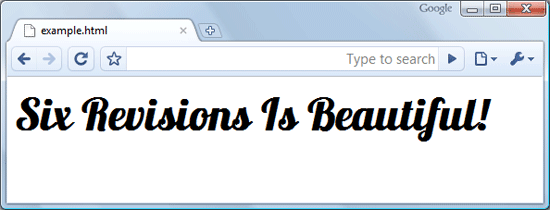
Result:
A screenshot of the above code block through Google Chrome 4.1
The text generated ("Six Revisions Is Beautiful!") is normal HTML text, so you can add more styles in your style element if you like (in our example, we only use one element: h1).
Requesting Multiple Fonts Using Google Font API
Let’s say you need three fonts from Google’s Font Directory. Don’t create multiple requests. Multiple requests increase the number of HTTP requests a web page makes. The fewer HTTP requests you make, the better in terms of web page response times.
Instead of multiple stylesheet link tags, use the following format for the href property of your stylesheet link tag.
The following example URL request will load all the three fonts (Vollkorn, Yanone, and Droid Sans) in one request.
http://fonts.googleapis.com/css?family=Vollkorn|Yanone|Droid+Sans
Now you can use any of these three fonts in your style elements.
Things to Note
Separate font names by a | without spaces between them. Note the use of + in the Droid Sans font. Use the + sign in font names that have spaces. In our case, the font name is Droid Sans, so we used Droid+Sans in the request link.
Tip: Using too many fonts in one request may slow down page response times. So load only the fonts you need. Be conservative: Just because it’s free doesn’t mean you should go crazy with @font-face.
Font Weights and Style for Google Font API Fonts
The web fonts also have font weight/style variations. To use these variations, append a colon (:) to the name of the font followed by the styles and weighs.
In the example below, we request the bold and bold-italic variation of Vollkorn and the italics variation of Inconsolata.
http://fonts.googleapis.com/css?family=Vollkorn:bold,bolditalic|Inconsolata:italic|Droid+Sans
There are also shortcodes for the variations of each font. They are:
- Bold: b
- Italic: i
- Bold-Italic: bi
Here’s an example that uses shortcodes:
http://fonts.googleapis.com/css?family=Vollkorn:b,bi|Inconsolata:i|Droid+Sans
Things to Note
Use a colon (:) after the font name without spaces in between them followed by the variation’s name (i.e. bolditalic) or variation name’s shortcode (i.e. bi). If you need multiple font variations for one font, separate them using a comma (,) without spaces in between them.
Google Font API Enables Prettier Web Typography
The web design industry is abuzz with a solution to the age-old problem of typeface limitations on the Web. Are you using @font-face yet? If you aren’t using it yet, why not? Share your thoughts and opinions in the comments.
Related Content
- A Basic Look at Typography in Web Design
- 20 Websites with Beautiful Typography
- Basic CSS3 Techniques That You Should Know
- Related categories: Web Design and CSS


59 Comments
Chis Creed
June 1st, 2010
Thanks for the guide Divyang – I’ve been meaning to try out the API since it was released, although I notice that there aren’t that many fonts to choose from right now. Hopefully a wider range will be added over the next few months.
DNT
June 1st, 2010
Well its good one still i haven’t checked out my blog. Just getting started will love this typography from google
hubeRsen
June 1st, 2010
love it!
Joshua
June 1st, 2010
Great stuff, I hadn’t heard of this from google. Hopefully they expand more fonts too!
Joe Malleck
June 1st, 2010
Thanks for sharing. I’m definitely going to be giving this a shot on a project I have coming up. Very Helpful.
Young
June 1st, 2010
wow. google strikes again? is there really no catch to this?
i’d personally like to see some asian fonts get on it.
j08691
June 1st, 2010
Looks a bit pixelated and jagged in just about every browser on Windows for me. On Linux it looks much more smooth.
Projektvega
June 1st, 2010
Fantastic feature :)
Hope in the future will support all opntype characters – mean – now you are not able to use other than English languages.
matthias
June 1st, 2010
Hi mate, it’s old stuff, look here:
http://www.matthias-kuehl.de/_LAB/player_flv_multi_01/
cheers
Divyang
June 1st, 2010
@Chis Creed, @Projektvega, @Young, @Joshua
Webfonts project is in the starting phase and we will see more fonts as well as support for non-English languages too.
@Joe
Hope this feature can be used successfully in to your production website.
Share the results.
Sergej
June 1st, 2010
Wow, thats really great, i didn’t knew this feature till now.
I hope there will be more fonts available soon…
dandy
June 1st, 2010
is it like ‘cufon’ font replacer?
What if the requested fonts aren’t installed on user system. Will he still get the same result.?
Thanks.
Jacob Gube
June 1st, 2010
@dandy: Cufon uses a different technique, but they’re trying to do the same thing: more typefaces on the web for web designers. Yes, it will work even if the fonts aren’t installed on the user’s system. The limiting factor in this instance is whether or not the web browser that the user is using supports
@font-faceor not.Jacob Gube
June 1st, 2010
Sorry, my last answer would be ambiguous to some folks reading it. What I mean is that Google Font API, which uses @font-face for embedding fonts, aren’t uniformly supported by all web browsers. For browser compatibility, see this post on Mozilla Developer Center: https://developer.mozilla.org/en/css/@font-face
Tom
June 1st, 2010
I started using droid sans on my website about a week ago.
I think the google font directory is a great resource for anyone interested in an easy solution to add some unique fonts to there pages.
Ogvidius
June 1st, 2010
I love the fonts available on the Google API and they look great. It’s unfortunate that the fonts look so ugly on some set ups though. I don’t mean to be Mac biased but the fonts look great on Chrome on Mac but the same fonts look bobbins on Chrome for windows. Maybe it’s my set up but from what I’ve seen so far, the fonts don’t look the same for all users. It’s certainly a step in the right direction but I’ll have to stick with ‘standard’ web fonts for now until there is better support for these fonts available.
I was surprised Chrome didn’t seem to support the fonts very well (seing as it’s a google product!). It would be great if there was some kind of font-stack option for things like ‘If this font looks bobbins, use Georgia’. Good article though, and some useful tips and info in here. Nice work.
Nelson Wells
June 1st, 2010
I’m looking forward to using the font directory in upcoming projects. I hope that the font directory grows in the coming months… there are a lot of high quality, free fonts out there that deserve to be included. I look forward to seeing other sites use the fonts as well.
James Brocklehurst
June 1st, 2010
The API really does show great potential, but currently most of the available fonts have not been designed for the screen and are ugly and at times unreadable without anti-aliasing. Droid is the most notable exception.
I’ve got some screengrabs to prove my point, plus a printable reference of the most acceptable fonts in the directory here Link
Mike
June 1st, 2010
@Ogvidius: Rendering across different platforms is a known issue. You might find this link useful:
http://allcreatives.net/2009/12/05/smoother-font-face-embedding-in-ie-7-8/
Bryan Nielsen
June 1st, 2010
If anybody is looking for all the font files to use on their system with a design program I created a package of them with all of the relevant licensing. Here’s the link: http://www.fiercereality.com/2010/06/google-web-font-compilation-for-download/
Will Moyer
June 1st, 2010
@j08691 @Ogvidius I discovered a little hack to force webkit browsers (on any OS) to anti-alias the text. It looks much better, but still doesn’t fix anything for IE or Firefox on Windows.
Let me know what you think: http://willmoyer.com/plato/
Hung-Su
June 1st, 2010
It doesn’t seem to work for Firefox 3.6.3 on Windows, and I’m not liking these reports of jaggedness that I’m hearing. I’ll keep my eye on this however.
Vectorbunker
June 1st, 2010
Great Stuff Nice man thanks..
barrington
June 2nd, 2010
Great post! this will be very useful.
Aristophrenia
June 2nd, 2010
Or just use flash – like everyone else for past ten years.
Once again -HTML strikes back – ten years later. Dang am i late agaaaaaaaaain!?
Theo
June 2nd, 2010
This is a great service from google, hope that the font collection will grow. However in the meantime i would suggest ( for those who want more fonts ) http://typekit.com/ you have to pay for it but they have reasonable prices.
David Wheatley
June 2nd, 2010
Thanks for posting this article, the fonts look great, perfect for personal projects. However, i’m not so sure about using this service commercially as @font-face has some copyright issues that have not been resolved and larger web companies are being increasingly cautious about using such things. That said, my next private/freelance project I think I’ll be using it as it’s very easy to use, especially compared to SIFR.
HowToPlaza
June 2nd, 2010
A very well-written primer on Google fonts. Even I wrote a blog post on this a few days ago, but I like this one better :-)
~~ Sarah ~~
Matteo Di Capua
June 2nd, 2010
Currently using Google font API in a project and experiencing problems. The variants for the font “Droid Serif” don’t work in firefox under Windows Vista and Windows 7. The font displayed is actually Droid Serif, but FF ignores the font-style and font-weight. Anyone experienced the same? Any suggestions on how to fix it?
Darren Taylor
June 2nd, 2010
Anyone experienced problems with this behind a firewall? Viewing on my corporate network I just see standard fonts.
Christopher
June 2nd, 2010
Why is it that there are 30 comments and not one person has mentioned how the fonts looks jagged and aliased in Windows 7?
I don’t know if it’s an OS-specific problem or what, but I tried the Google Web Fonts on the same day that they came out, and instantly noticed how jagged and unreadable they are.
I would absolutely love to use the fonts; too bad they don’t render correctly.
Not consistent across browser and OSs == can’t use it
Will Moyer
June 2nd, 2010
I did mention it Christopher, and I mentioned a hack that works for Webkit browsers on Windows.
Read here: http://willmoyer.com/plato/
Jordan Walker
June 3rd, 2010
I really like the approach Google is taking with the Internet.
Christopher
June 4th, 2010
@Will: Interesting hack, but I’m still waiting on an official fix from Google (so that I don’t have to worry about IE or Firefox or any other inconsistencies). :)
Thanks for sharing though, I’ll check it out!
I guess I sounded mad in my original post because I was so excited about this service and then felt the crash once I realized that it wasn’t working 100%. :(
Either way, this is an exciting step forward for the Web!
Satya Prakash
June 5th, 2010
An small app to play with Google fonts
Henderson
June 5th, 2010
Yeah, it’s good, very useful, thanks :)
Nauman Akhtar
June 6th, 2010
I hope google adds more fonts too :)
Thanks for sharing
napsell
June 7th, 2010
I love typography in webdesign. Cufon, sIFR and now google fonts are big steps to web typography,but now I`m waiting for suporting RTL languages in these systems…
Cris
June 12th, 2010
First I used cufon, and now GoogleFont.
It works great with my website! please check it and give me feedback, I think it’s an amazing and easy use of webfont.
Chris
June 12th, 2010
Dang.. I was hoping this would somehow escape the jagged-ness that Typekit and @font-face suffer from… guess not. :’(
Clervius
June 15th, 2010
Designing my site now and I’m SOOO thankful for this.
Falk Köppe
June 19th, 2010
We just released a Google-Font-Collection ZIP file together with a simple perl script to download all available Google Font API fonts, so that you can use them offline in Photoshop for example.
http://www.firmennest.de/firmennest-blog/?p=648
ospreye
June 21st, 2010
I have used the sifr technique before, and was aware of typekit’s offering, but was amazed to Google offering this service, and at no cost. There is one drawback I notice is when the page initially loads it uses the next available fallback font to display text until the Google font has downloaded. This leaves me with the same blinking problem I have with sifr. Any ideas on how to work around this one?
Thunder
July 8th, 2010
I just tried google fonts for the first time a day ago and was very pleased with the results. But I noticed today when my Safari browser was started up, the same Safari browser that I had used yesterday with Google fonts, and tried to start the first window with my Google font dependent website that Safari would not load the site until I answered a pop-up that said the website was trying to install the font I am using and did I want to allow Safari to load this font?
I was not expecting this to be a browser security issue.
I can just imagine people going to my site for the first time and having their browser refuse to load my site until they responded to a “warning” inquiry.
I have not read about this issue before.
Now I am hearing about jaggedness and problems with Windows.
Maybe this technology is not ready-for-primetime…..
Mike I
July 28th, 2010
I’ve found that some fonts from the Google Font API don’t display properly in Chrome or Internet Explorer, I show the solution here:
http://webdesignandsuch.com/2010/07/fix-fonts-that-dont-work-with-google-font-api-in-internet-explorer-or-chrome-with-font-face/
Jorgen
July 30th, 2010
You should check out the new preview tool for Google Font API. The tool makes it easy to experiment with different settings, and create the required CSS code. See more here:
http://tips4php.net/2010/07/google-font-api-new-preview-function/
Peter
September 20th, 2010
Can people PLEASE stop using IE. It sucks so bad. Why is it that all standards, HTML5, Webfonts, and stuff like that works BEUTIFULLY on EVERY Browser but for fuckin IE.
Fuck IE. Fuck IE!!!
Jesse
November 7th, 2010
I love the idea of using the API, but for some reason, Safari 5 seems to give me a headache, displaying an odd character instead of the desired font. The correct text is there (if you copy/paste, you get the actual words) but the display is wrong (an example: http://yfrog.com/4xgoogleip). Anyone experience the same issue?
Geoff
January 13th, 2011
Bizarre that they are beautiful on Chromium (Ubuntu 10.10) yet jagged on Chrome (Windows 7) when the reverse is so often the case.
Don McArthur
February 12th, 2011
Have you tried printing a web page that only uses web fonts? Doesn’t work with up-to-date Chrome or Safari on Mac OS X, I’m not sure of other resources.
Am I missing something?
rob
March 31st, 2011
You guys probably don’t care, but it should be noted that this is also another way for google to have a hit-counter on your website, so it can track who your visitors are (by means of the referer that links to their css).
vale
May 27th, 2011
Hey it seems common ligatures aren’t included in the web-fonts offered for free by Google, on the other hand they also say that paying for them will enable “special features” of the typeface included ligatures. Does anybody tried this out?
PS to let webkit browsers render ligatures the CSS
text-rendering: optimizeLegibility;has to be set.
Jazzvox
June 8th, 2011
I’m using Cabin on this site, other GoogleWebFonts on other sites for a while. There are still issues in Browsers, as they seem to interprete *px size and type=bold in different ways. In addition, I’m not shure if CSS ‘text-indent’ works out for this fonts … in all browsers.
The ‘bold’ issue is resolved by following your advice for the import-in-header link: ‘Cabin|Cabin:bold’
The ‘size’ issue seems to be happening for h1, h2 … IE oversizes them, no matter what I do :(
ugly
July 18th, 2011
those google web fonts look pretty on my ubuntu, but pretty ugly with jagged edges on my windows. probably some video card thing.
figman
August 7th, 2011
@ugly
I believe it had nothing to do with the video card.It simply has to do with the way the OS renders the fonts within the browser.
Up to date Windows, even with ClearType enbled is the worst in regards to rendering Fonts and WebFonts alike.
This is very disappointing considering 50% of the population uses Windows
Durgesh
August 18th, 2011
great tutorial. Thanks.
Francis Boudreau
October 10th, 2011
Thanks a lot for this article!
I didn’t know about the Google Web Font API, but now I wish I knew it sooner…!
Pablinho
November 20th, 2011
Great selection of fonts they have… and it keeps growing.
Only problem for me is how the different the font looks from browser to browser. For example, most fonts look awful on Safari..
PeterU
November 28th, 2011
Hello.
I’ve been playing with web fontst for a while and love the prospect of that choice!
However, if I try and print a page that references Google fonts, the printer uses ITS default instead.
Clearly the printer can only use what fonts it has installed.
But surely in our modern days, there is a way of “pushing through” the web font through to the printer?
If yes, how do we achieve? I’m a bit lost.
Thanks,
Peter
Leave a Comment