WordPress 3.0: Ultimate Guide to New Features
WordPress 3.0 — the newest major version of WordPress — is one of the most highly-anticipated open source upgrades this year.
WordPress is no doubt one of the most used publishing platforms. Large websites such as Smashing Magazine, Mashable, TechCrunch, the site you’re on now, and others use it to run their high-traffic websites.
According to the timeline on WordPress trac, WordPress 3.0 should have been released on May 1, 2010, but now, the core developers of WordPress have removed the release date because of bugs that still needs to be fixed.
There are expectations that the production version will be released in the last week of May, 2010 or in the early start of June, 2010.
WordPress 3.0 has already made so much buzz because of some major and fresh features that innovate the publishing platform’s user interface.
In this article, to give you all a head start for the release, I will walk you through the notable new features of WordPress 3.0. For the discussion, I used the latest beta release, which you can download from here.
The best way to experience WordPress 3.0 is by installing it on your own computer (localhost) using this easy to follow guide so that you can follow along with me hands-on.
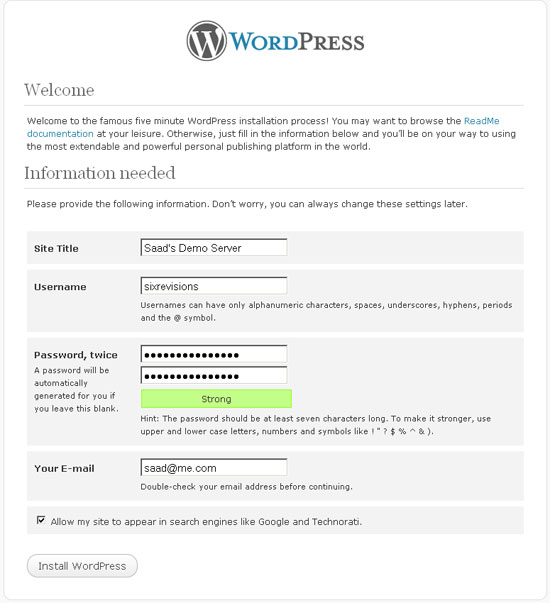
WordPress 3.0′s User Registration Interface for Installation
The new welcome screen got a big overhaul for better security and usability. It now has options for choosing a username and setting your own password.
Before, having the default username automatically generated as "admin" was a major security risk in all the previous releases of WordPress, especially for non-web-developer users and was bad from a usability standpoint. After finishing their WordPress install, users had to create a new username and then delete the default "admin" user for security against bruteforce hacking attacks.
That’s been resolved with WordPress 3.0′s new Welcome screen.
The New Welcome Screen
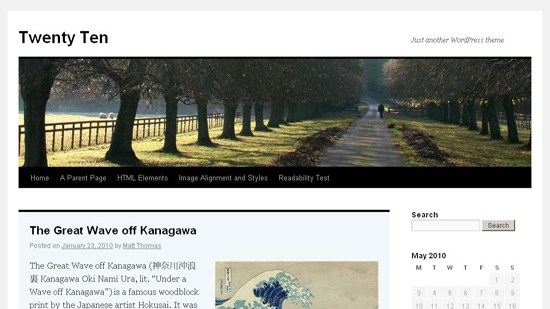
WordPress 3.0′s New Default Theme: “2010″
The default Kubrick theme has been retired in WordPress 3.0 and removed from the installation package.
WordPress 3.0 will come bundled
with a new default theme called 2010 which will have built-in support for child themes, header customization and background
alterations. The new theme also has built-in support for drop down menus.
This is a brilliant move from WordPress to give users a fresh new look when they launch their WordPress site.
The Auttomatic (the creators of WordPress) theme team will release a new default theme every year which will come bundled with WordPress. That’s the reason this theme is named 2010.
2010: The Default WordPress 3.0 Theme
Header Customization in WordPress 3.0
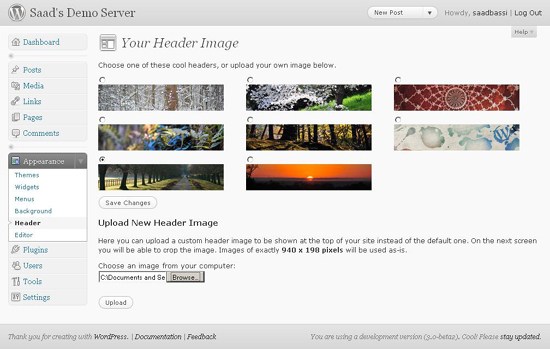
Users can easily upload their own header backgrounds with this new WordPress 3.0 feature directly from the WordPress administration panel.
“2010″ comes with 8 beautiful header backgrounds (featured below). There is also an option for uploading your own custom headers.
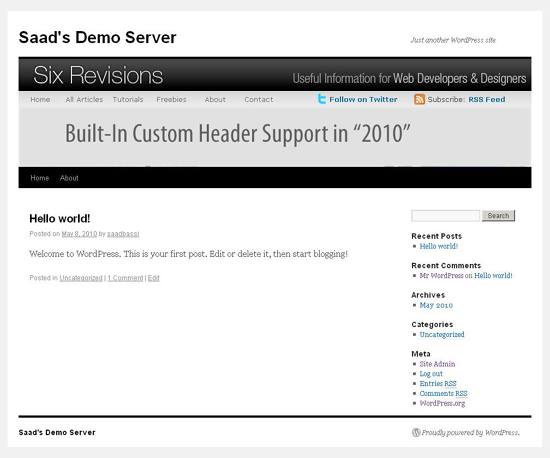
Below is the screenshot of this new WordPress feature followed by a screenshot which is a result of my experimentation.
Header Panel in WordPress 3.0
A Custom Header Made Using the Header Panel in WordPress 3.0
If you want to add this functionality into your theme, then the code snippet below will do the trick. The 2010 WordPress 3.0 theme uses this snippet to enable support for custom header. You will have to use this snippet in functions.php of your WordPress theme to support the custom header functionality. Read the code comments for a walkthrough of what’s going on.
// Your changeable header business starts here define( 'HEADER_TEXTCOLOR', '' ); // No CSS, just IMG call. The %s is a placeholder for the theme template directory URI. define( 'HEADER_IMAGE', '%s/images/headers/path.jpg' ); // The height and width of your custom header. You can hook into the theme's own filters to change these values. // Add a filter to twentyten_header_image_width and twentyten_header_image_height to change these values. define( 'HEADER_IMAGE_WIDTH', apply_filters( 'twentyten_header_image_width', 940 ) ); define( 'HEADER_IMAGE_HEIGHT', apply_filters( 'twentyten_header_image_height', 198 ) ); // We'll be using post thumbnails for custom header images on posts and pages. // We want them to be 940 pixels wide by 198 pixels tall (larger images will be auto-cropped to fit). set_post_thumbnail_size( HEADER_IMAGE_WIDTH, HEADER_IMAGE_HEIGHT, true ); // Don't support text inside the header image. define( 'NO_HEADER_TEXT', true ); // Add a way for the custom header to be styled in the admin panel that controls // custom headers. See twentyten_admin_header_style(), below. add_custom_image_header( '', 'twentyten_admin_header_style' ); // ... and thus ends the changeable header business. // Default custom headers packaged with the theme. %s is a placeholder for the theme template directory URI. register_default_headers( array ( 'berries' => array ( 'url' => '%s/images/headers/berries.jpg', 'thumbnail_url' => '%s/images/headers/berries-thumbnail.jpg', 'description' => __( 'Berries', 'twentyten' ) ), 'cherryblossom' => array ( 'url' => '%s/images/headers/cherryblossoms.jpg', 'thumbnail_url' => '%s/images/headers/cherryblossoms-thumbnail.jpg', 'description' => __( 'Cherry Blossoms', 'twentyten' ) ), 'concave' => array ( 'url' => '%s/images/headers/concave.jpg', 'thumbnail_url' => '%s/images/headers/concave-thumbnail.jpg', 'description' => __( 'Concave', 'twentyten' ) ), 'fern' => array ( 'url' => '%s/images/headers/fern.jpg', 'thumbnail_url' => '%s/images/headers/fern-thumbnail.jpg', 'description' => __( 'Fern', 'twentyten' ) ), 'forestfloor' => array ( 'url' => '%s/images/headers/forestfloor.jpg', 'thumbnail_url' => '%s/images/headers/forestfloor-thumbnail.jpg', 'description' => __( 'Forest Floor', 'twentyten' ) ), 'inkwell' => array ( 'url' => '%s/images/headers/inkwell.jpg', 'thumbnail_url' => '%s/images/headers/inkwell-thumbnail.jpg', 'description' => __( 'Inkwell', 'twentyten' ) ), 'path' => array ( 'url' => '%s/images/headers/path.jpg', 'thumbnail_url' => '%s/images/headers/path-thumbnail.jpg', 'description' => __( 'Path', 'twentyten' ) ), 'sunset' => array ( 'url' => '%s/images/headers/sunset.jpg', 'thumbnail_url' => '%s/images/headers/sunset-thumbnail.jpg', 'description' => __( 'Sunset', 'twentyten' ) ) ) );
WordPress 3.0 Background Customization
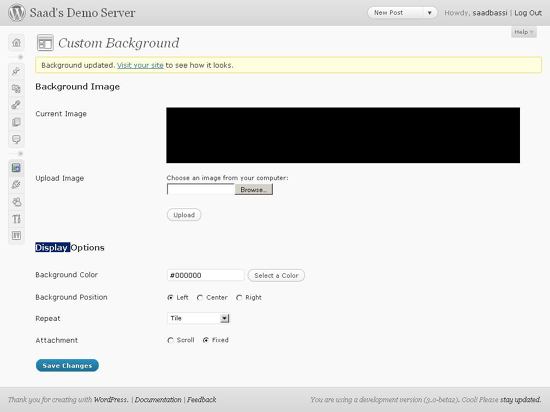
The 2010 WordPress 3.0 theme also permits users to change the background of posts and pages from the backend administration panel.
There are a lot of options such as the ability to choose different colors and uploading an image to set as your background.
Custom Background Panel
Adding custom background functionality in your own theme is pretty simple. Just add this one line of code in your theme’s functions.php file.
add_custom_background();
After that, users who have activated your theme will get a Background tab under the Appearance tab.
New Link Shortener
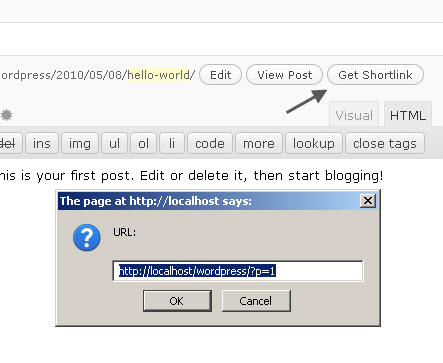
WordPress 3.0 offers better micro-blogging (e.g. Twitter) integration with its new feature called Shortlink, which gives you the ability to generate branded short links (in a similar way as is.gd or bit.ly) for sharing your posts and pages in social media.
WordPress 3.0′s Easy Navigation Menu Management
The exciting menu management feature is one of the most anticipated and demanded features of WordPress end-users.
This new feature will make it easy as pie for users to add new navigation menus in their WordPress-powered blogs and websites.
You will need no coding experience to modify your WordPress navigation: Just drag and drop menu items, and that’s it.
You can add outgoing links, categories and pages in one single menu just by using the navigation menu’s management feature. This is an insanely awesome and powerful feature to make WordPress site management all the more easier for WordPress users.
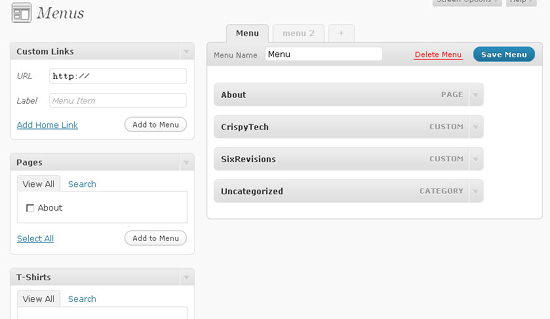
See how I made the navigation menu below.
Menus Panel (Features Drag and Drop)
The Result of Adding a Menu in My WordPress 3.0 Localhost Installation
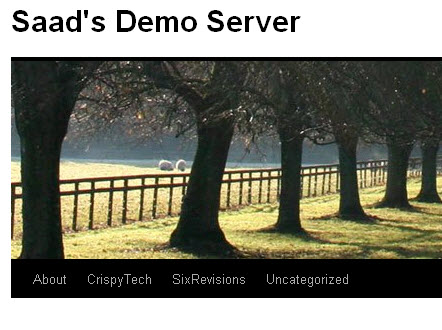
In the 2010 WordPress 3.0 theme, the default menu gets replaced with the menu you create.
But you can create dedicated widget areas for placing navigation menus in the sidebar and other parts of your custom WordPress theme.
You can add support for this feature by adding this line in your theme’s functions.php file.
add_theme_support( 'nav-menus' );
After this line, you will be able to see the Menus tab under the Appearance tab. But in order to show your navigation menus in your WordPress theme, you will need to use the wp_nav_menu() WordPress theme function.
To give you an idea, the WordPress 3.0 2010 default theme uses this code snippet to show a custom menu in header.
wp_nav_menu( array( 'sort_column' => 'menu_order', 'container_class' => 'menu-header' ) );
Support for Author Templates
Each Author in WordPress has an ID, just like categories and pages.
In WordPress 3.0, you will be able to design individual author templates. This feature can come handy on multi-author blogs like, for example, the site you’re on: Six Revisions.
Let’s use an example to illustrate how this new functionality works: I am an author (Saad Bassi) here at Six Revisions while Jacob Gube is the Chief Editor.
Let’s pretend Jacob created a custom author page for me, called author-saad.php.
With the new functionality, WordPress will first look for author-saad.php before author.php in the template files to render my page differently from the default author.php design.
The same method can be used to style Jacob’s author page, and hence, both of us will have different author templates. Pretty cool, right?
WordPress 3.0 Improves Content Management with Custom Post Types
Custom post types is another highly-demanded feature by WordPress theme developers. This feature will give them a lot of flexibility while using WordPress as a fully-featured content management system.
It will allow WordPress theme developers to create custom content types outside pages and posts. There were techniques to do this in the past, but not as robust and easy when compared to content management systems like Drupal.
In the following code snippet, I will add a custom “T-Shirts” content type tab in the WordPress backend by sticking this code snippet in my functions.php file.
function post_type_tshirt() {
register_post_type( 'tshirt', array( 'label' => __('T-Shirts'), 'public' => true, 'show_ui' => true ) );
register_taxonomy_for_object_type('post_tag', 'tshirt');
}
add_action('init', 'post_type_tshirt');
After adding this code, you should see the T-Shirts tab in the sidebar.
Custom Post Type called T-Shirts
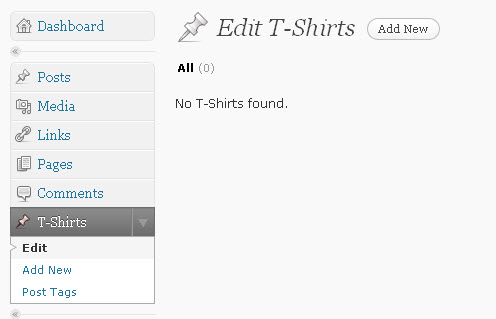
How do you retrieve these posts from your WordPress database? In the snippet below, I have called "post" and "tshirt" from the WordPress database with a little help from WordPress conditional tags.
add_filter( 'pre_get_posts', 'my_get_posts' );
function my_get_posts( $query ) {
if ( is_home() )
$query->set( 'post_type', array( 'post', 'tshirt' ) );
return $query;
}
WordPress 3.0′s Improved Custom Taxonomies
Custom taxonomies in WordPress is another feature which will help developers build powerful websites with less effort.
This feature is not new to WordPress 3.0; it was already available in WordPress 2.8. However, in WordPress 3.0, custom taxonomies get a revamping, loaded with new options and abilities.
With new enhancements, custom taxonomies become easier to use and allows for hierarchical relationships.
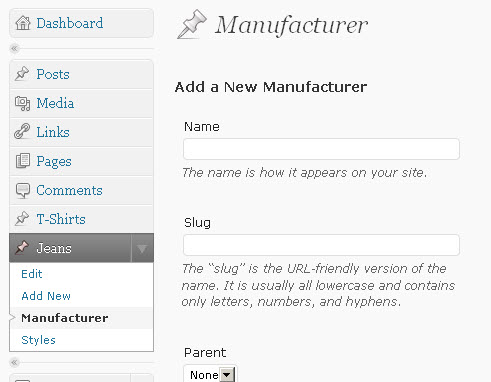
In the following snippet, I have created a new post type “jeans” with custom taxonomies of “Manufacturer” and “Style”.
function post_type_jeans() {
register_post_type(
'jeans',
array('label' => __('Jeans'),
'public' => true,
'show_ui' => true,
'supports' => array(
'post-thumbnails', //enable post thumbnails
'trackbacks', //enable Trackbacks
'comments') //enable Comments
)
);
// Here we add the custom taxonomy for Manufacturer like Levi's and Se7en. We are creating categories specific for this post type.
register_taxonomy( 'Manufacturer', 'jeans', array( 'hierarchical' => true, 'label' => __('Manufacturer') ) );
// Here goes the code for adding custom taxonomy for Style like "ankle jeans" and "baggy jeans".
// We are going to add tags specific for this post type.
register_taxonomy( 'style', 'jeans',
array(
'hierarchical' => true, // Enable or disable hierarchical structure
'label' => __('Styles'), // The Label to show in WordPress backend
'query_var' => 'style',
'rewrite' => array('slug' => 'style' ) // Slug to use in URLs
)
);
}
add_action('init', 'post_type_jeans');
Here is the result of the above code.
An Example Use of Custom Taxonomies in WordPress 3.0
Multi-Site Feature with Only One WordPress 3.0 Installation
Another big update in WordPress 3.0 is the merging of WordPress MU – a fork of WordPress that lets the user create and manage hundreds of thousands of blogs with a single install of WordPress – and the plain-jane WordPress.
What this means in nutshell: You can create a number of websites using only one installation of WordPress.
Imagine that you’re a web developer who wants to build and host your client’s blogs and sites — you can run hundreds of client sites under one WordPress installation. If you have a scalable VPS, you can do all of this more reliably and affordably than ever before!
This feature is not enabled by default. You can enable multi-site functionalities by adding the following line to wp-config.php.
define('WP_ALLOW_MULTISITE', true);
After updating the file, you will get a tab of “Network” under the “Tools” menu as shown below.
The Network Panel in WordPress 3.0
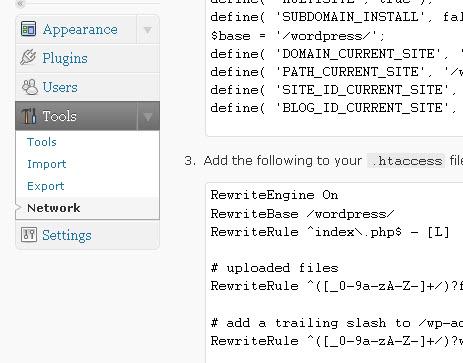
You can choose whether to use sub-domains or sub-directories for network websites.
Note: You can’t select between the two options on localhost (if you installed WordPress 3.0 during this walkthrough), so I suggest testing this feature on an actual server.
Final Thoughts on WordPress 3.0′s New Features
It’s evident from all these changes that WordPress is definitely going on the right path of becoming a fully-featured publishing platform.
There is always a room for improvement, but this extensive development in WordPress 3.0 shows the dedication of WordPress core developers and the WordPress community to the world’s most famous publishing platform.
If I were to encapsulate the new features in one statement, this is what I would say: It’s evident that WordPress development is focused on making things easier for WordPress developers when it comes to using WordPress for building multiple content management systems rather than just single-site blogs.
The second most prominent thing to note is that there are minor changes in the WordPress user interface that will help WordPress beginners and users that aren’t so technologically-savvy. For example, if you haven’t set up permalinks after a fresh WordPress installation, you will get a warning that links to the Permalinks administration panel right beneath each post and page title in the WordPress writing panel.
What do you think about WordPress 3.0? What exciting features does it offer you? How will these changes impact your development of websites and blogs? Please join the discussion in the comments!
Related Content
- 30 Excellent WordPress Video Tutorials
- Using XAMPP for Local WordPress Theme Development
- 6 Critical WordPress Plugins You Should Have Installed
- Related categories: WordPress and Web Development

Saad Bassi is a 20-year-old web developer from Pakistan. He is the Co-Editor at 

177 Comments
Kaye Media
May 17th, 2010
Very good, glad I can find the complete guide!
esranull
May 17th, 2010
very very nice post thanks a lot
WebMalta
May 17th, 2010
Very interesting stuff…thanks :)
Omer Greenwald
May 17th, 2010
The drag and drop navigation UI and the easy background setup are 2 new features that take WordPress to a new level of user friendliness and ease of use. The menus setup addition is the final word that WP is a lot more than just a blogging platform, and can be used to build most of the websites out there.
Terrific post, Saad. I’ve been waiting for a comprehensive professional overview of new WP 3.0 features for some time now, and this was definitely a clear and interesting read.
Dam
May 17th, 2010
Good article!
abhishek
May 17th, 2010
hi,
I ma using current beta version of wordpress CMS. I know most of the features. Even though nice effort to collect all at a single place.
Elizabeth Perry
May 17th, 2010
Okay, now I am really looking forward to 3.0; thanks for the walkthrough!
Torsten
May 17th, 2010
Very nice overview. Cheers. Prevents me from installing the Beta on my local machine to see what is new. Great work
Rajib Roy
May 17th, 2010
Nice to read the article
Saad Bassi
May 17th, 2010
Thanks all for your comments. It will motivate me to write more and more.:)Let me know if you have some questions. I will be happy to help you out.
@Omar
Totally agreed with you.:) The new Menus will give a genuine boost to WordPress. WordPress community is putting a lot of effort in making it even better than before.
alex
May 17th, 2010
nice article, understand better what’s coming.
AndyW
May 17th, 2010
I really hate the new 2010 theme – it’s so bloated compared to Kubrick! I’ve been using Kubrick as the basis for new theme designs for client sites for years and it’s easy to get started with. I find myself stripping out so much before I can get started with 2010. Has anyone else found this?
Deluxe Blog Tips
May 17th, 2010
Nice article. I’m waiting for the official released of WordPress 3.0
Robine
May 17th, 2010
Really cool, thanks a lot!
Saad Bassi
May 17th, 2010
@AndyW
Well, the main motivation behind this new theme is to tell people to use Child Themes rather than modifying a theme it self. It became a serious problem when people started submitting edited Kubrick with custom styles to WordPress official theme repository. It’s a fact that you can’t edit it easily unless you are a WordPress ninja but you can’t say that it’s bloated. Just learn how to create child themes and you will love it too.:)
irfan ahmed
May 17th, 2010
Awesome Saad my friend and thanks alot.. great job .. keep it up
TheGKI
May 17th, 2010
Meh SR…
This sort of articles have been all over the web. Nettuts, Mashable, etc….. What’s the point of repeating the same content.
@Saad pls write something unique for the SR audience. Not something that you summarized from the other blogs.
saad irfan
May 17th, 2010
nice article bro… :) thanks for the detailed article…..
Jacob Gube
May 17th, 2010
@TheGKI: If, in fact, someone else has done a walkthrough exactly the same way Saad has here, you’re still making an assumption that all readers of Six Revisions read these other sites that you’re talking about.
DazzlinDonna
May 17th, 2010
I’m wondering if anyone has gone through the upgrade process. Curious if there are any “gotchas” to be aware of. Big changes like this are great for starting fresh, but upgrading and using themes designed for previous versions, sometimes break things. That’s to be expected of anything, of course, but was just wondering if there was a set of known issues to consider when upgrading.
Nikos
May 17th, 2010
Nice article! Ok… some things are found elsewhere too, but still a great article! Thanks
Chris
May 17th, 2010
Nice break down of the new features. I am hoping we wee the final release soon.
Jordan Walker
May 17th, 2010
Can not wait to dive into this version.
Daryn St. Pierre
May 17th, 2010
This is a great guide. There’s a few things mentioned here that I hadn’t seen yet. Custom post types, taxonomies and the drag-and-drop menus are all really welcome features. I already have uses for all of those.
Jacob Gube
May 17th, 2010
@DazzlinDonna: Just a theory: A lot of plugins that you’re using now may not be supported on 3.0 yet.
Daryn St. Pierre
May 17th, 2010
@AndyW — I haven’t used the 2010 theme yet but when it comes to building websites for WordPress, I always found myself doing the same thing as you. The Kubrick theme has all of the core elements that one needs in a WP site without having to strip out a lot of code.
Saad Bassi
May 17th, 2010
@TheGKI
I would love if you can show me a single article on web written comprehensively like this one. If you want us to cover some specific topic then let us know. We always welcome “constructive feedback”.
@DazzlinDonna
If you have developed a WordPress theme then it should work fine as usual with WordPress 3.0. Some new changes will force many tutorial websites to update their tutorials on how to create WordPress themes as now by default WordPress 3.0 requires 7 files otherwise it will not recognize your theme.
@Daryn
Great. WordPress 3.0 will surely rock.:)
Gooya IT
May 17th, 2010
I really do not know what to say with this new system WordPress’re changing, and perhaps want to look and said, service Blogger and I like the Joomla lays behind
HowToPlaza
May 17th, 2010
This is a great review and introduction of WordPress 3.0…eagerly awaiting its final release. It’s also encouraging that blogging and its primary platform are getting stronger with every passing year.
Erik Kubitschek
May 17th, 2010
Getting more and more impressive with every release. Excellent information.
Jared
May 17th, 2010
Looking forward to it! Thanks for the great info!
Coffeemuses
May 17th, 2010
@DazzlinDonna: That’s the whole reason I set up a “new” full install on a hidden domain for testing purposes. I want to know before I upgrade that the theme and plugins I use are good to go. Over the years, too many upgrades have caught me with sections of my web down while I scramble to redesign after the fact.
This time I felt the cost of adding a domain was worth it to assure myself that everything works before the change.
Erika Napoletano
May 17th, 2010
Great info. It’ll be interesting to see how third party theme developers like iThemes and Thesis will be affected by WP stepping up to the plate and adding this much-needed functionality.
robert
May 17th, 2010
Brilliant!
Great Article… Looking forward to put my hands on it…
Jacob Gube
May 17th, 2010
@Coffeemuses: In my opinion, it’s easier/better/safer (security-wise) to set up a test installation locally. For example, a downside of installing another copy of your site on the web is that it might get indexed by search engines (unless you included a robot.txt file to exclude it from search engine results). Check this tutorial on installing WordPress on your computer. I’d download all of your existing files onto your computer, then export your database data (there’s an export tool built into WordPress), import it in your local installation, and then upgrade to 3.0.
Martin Hyde
May 17th, 2010
Great article, looking forward to the release. Thanks
Jon
May 17th, 2010
I really can’t wait until WP3 gets out of beta. I’ve been holding off converting my latest design until I can put it on WP3. The new custom features should get rid of alot of the plugins you needed to CMS-ify wordpress.
sanedu
May 17th, 2010
I’m really wondering why there is no work to improve roles and access rights. I would really like to configure a closed area for family and friends but do not want to rely on workarounds or thirdparty plugins.
Marco Barbosa
May 17th, 2010
This is very nice but isn’t there any plugin that makes you use this functionality in a easier way ?
Why does everything in WP still requires PHP snippets ?
Leo
May 17th, 2010
Knowing someone’s username is a *not* a security risk, and brute force attacks are absolutely impractical over an internet connection.
There is no way that you will be able to make the billions of login attempts required to get into an account that has a non-dictionary password over http. Brute force is generally only useful when you have a dump of a database with hashed passwords, and then you would have the usernames anyway, so the entire point is flawed.
The only security risk is people who don’t follow the password advice and use a short dictionary word.
W3Mag
May 17th, 2010
Great article! Thanks for sharing Saad!
Saad Bassi
May 17th, 2010
Totally agreed with Jacob here. Pro tip
Syed Balkhi
May 17th, 2010
Excellent article once again on SixRevisions :)
Sadly, one of the most powerful features (Custom Post Types) was not covered thoroughly. Jacob, I recommend that you add a link to Konstantin’s site as a resource.
http://kovshenin.com/archives/custom-post-types-in-wordpress-3-0/ (Also the followup article that he did to this one).
Also suggesting a plugin (for those users who don’t know a lot of codes) would be a good idea. Brad Williams’ plugin Custom Post Type UI would be a great addition to this article.
Other than that, a great article done by Saad.
richard carpenter
May 17th, 2010
Great article…. cant wait to give it a whirl…!
Greg
May 17th, 2010
Great post played with 3.0 a bit but your post answered a lot of questions I was looking for thanks
Jacob Gube
May 17th, 2010
@Syed Balkhi: Thanks! To be fair to Saad though, Konstantin’s article just talks about Custom Post Types, while Saad’s was meant to be a more general view of the new WordPress 3.0 features, so comparing the two would be unreasonable and we had to sacrifice depth for breadth in this particular instance. And Saad also placed an example of Custom Post Types. Thanks for the link though, I enjoyed reading that post!
Saad Bassi
May 17th, 2010
@Syed Balkhi
A complete article can be written on Custom Post types but it was not the task assigned to me.:)
The plugin is great but once again, I wonder if some person who is not tech savvy would like to use this feature of WordPress. That’s also the reason behind why core contributors of WordPress didn’t build a ui for this feature in WordPress back end.
Kate Mag
May 17th, 2010
Good information on WP 3.0. Thank you for sharing. I get the feeling that WordPress will be a complicated product after 3.0. I don’t know that’s good or not.
Doug
May 17th, 2010
The custom post types and custom taxonomies have enormous potential to expand WordPress beyond just a blogging engine. I’d love to see some tutorials focusing on getting the most out of these.
Saad Bassi
May 17th, 2010
@Kate
Well, In fact not. That’s the great job done by WordPress Folks. It will be more developer friendly but will also be user friendly. I will suggest you to read the 2nd point of conclusion.:)
Jacob Gube
May 17th, 2010
@Doug: After @Syed Balkhi’s comment – and now yours – I’ve decided that Custom Post Types and Custom Taxonomies deserve tutorials all on their own, so expect those to be in the content line-up shortly. I’ve actually worked with custom taxonomies in WordPress 2.9 (implemented in our other website, Design Instruct). Wasn’t satisfied with it because I’ve worked with Drupal’s custom content types and taxonomies, but 3.0 looks like it’s catching up. Six Revisions being a site for Web Developers and Web Designers, I think a focus on these things would benefit a big group of readers and would be a great follow-up to this one.
John G
May 17th, 2010
Very interesting. I’m only a minimal WP user, but as it’s so popular I’ve been meaning to finally bite the bullet and get my hands dirty with it.
Looks like 3.0 will be the point to really jump on.
Syed Balkhi
May 17th, 2010
@Jacob – I certainly can’t wait for a more detailed writeup on those two most desired WordPress upcoming features.
In no means I was comparing Saad’s work to the other. I was merely pointing out that it was sad that this feature didn’t get enough attention.
@Saad – There are tons of users who would LOVE to use this feature, but they can’t because of their limited knowledge. That is why Brad’s plugin is great.
Btw: it wasn’t the only reason why the Core developers didn’t build a UI for this. There are a lot of features that can be included but are not. And here I would like to quote Mark Jaquith “But it would make a great plugin”.
If WordPress comes with everything in the core, then it will be one of the bloated open-source software that is deemed to crash.
But I do understand what you are saying. For the majority of WordPress blog users, Custom post types is not a necessity.
Shikeb Ali
May 17th, 2010
Count me in Saad’s so called wordpress developers so I’m not really goin to dive into its really deep backend but I am happy ’cause wordpress finally changed the default theme, not because the old one sucks ’cause everyone is changing and improving their UI from MSN.com to Wikipedia everyone has changed their layout designs. Second thing what clicked me is the built in header customization it sounds really good.
Wonderful article Saad :)
Gerard
May 17th, 2010
good news, wordpress 3 excellent and new change coding. I boomarked your post. good job.
Grün Weiss
May 17th, 2010
i wating when is done,
Raymond Parker
May 17th, 2010
Thanks for the review. I hadn’t seen any others yet.
I can’t wait to work with the new features, especially what sounds like an easy-to-build navigation menu
James
May 17th, 2010
looks like to hit all the major points – great informative post
Osvaldo Osorio
May 17th, 2010
I am very glad to see how madurity WP has been got. Excellent new features review. Congratulations!
Vincent Tobiaz
May 17th, 2010
Great detail with your overview, thanks a bunch
Steve
May 17th, 2010
Hello Saad,
I am working on a child theme based on Twenty-Ten, but am struggling to figure out a way to add a full width header. Do you have any ideas on how to accomplish this?
BTP
May 17th, 2010
that really nice blogging software. But, i think i am not install it now. I will wait until other support tools capable with this software. Thanks
gunnard
May 17th, 2010
Can’t wait to use wp 3.0 with The Standard Theme
Ritam Das
May 17th, 2010
Cool! Thanks for sharing…
Jennifer R
May 18th, 2010
I still love wordpress 2.9.x version, the new feature in WordPress 3.x is not necessary for the custom designed wordpress theme.
Steve
May 18th, 2010
WordPress 3.0 would indeed make wordpress the best blogging platform. m eagerly waiting for it. I also use WordPress for my blog. I am waiting for the time when I would be able to customize the header and background! You made a complete guide to WordPress 3.0 features.
Raoul
May 18th, 2010
Thanks a lot for this article. I look forward for a stable Version.
Elaine
May 18th, 2010
I honestly can’t wait for this to be released – the menu and custom posts features are going to be so useful!!
Ryan Ho
May 18th, 2010
Great improvements and modifications.
Veronica
May 18th, 2010
Thanks so much for this review! I have been looking forward to author templates for so long, can’t wait!
Saad Bassi
May 18th, 2010
Thanks for the appreciation and Feedback guys.:)
FF
May 18th, 2010
Saad, good article, thanks for running thru WP 3.0.
Good to see that WordPress Mu features can be enabled in this release – I can see WP gaining even more usage amongst enterprise clients.
F
Digitalgraphixx
May 18th, 2010
A really goog overview of all the new features of wp 3.0, i’m looking forward to the new version and hope there will be not much problems with theme funktions.
Valent Mustamin
May 18th, 2010
good article, but …
friends don’t let friends use the incorrect WordPress logo :)
http://www.valentmustamin.com/2009/07/friends-don%E2%80%99t-let-friends-use-the-incorrect-wordpress-logo/
Najam Siddiqi
May 18th, 2010
you have really done a great work you have introduced us new features in very easy way.
David Gwyer
May 18th, 2010
Thanks Saad,
Great overview of new features in WordPress 3.0. It is good to see so many new articles popping up about version 3.0. It doesn’t really matter if there is overlap with other articles etc.
For me, the more articles about it the better as this will get more people reading about it and using it – which is the important thing. I have a feeling that from WordPress 3.0 it will really begin to mature as a CMS. The next couple of years are going to be an exciting time for WordPress developers and users alike!
David
Unes
May 18th, 2010
Thank you for the article, i think that we will have some issues with plugins..
jiewmeng
May 18th, 2010
for me the most significant additions will be custom post types and custom taxonomies. it makes wordpress more than just a blogging tool, more towards CMS while keeping things relatively simple still
Rosti The Snowman
May 18th, 2010
Looks like it will be a fantastic upgrade!
Carl
May 18th, 2010
I can’t wait to see this upgrade although I’ll probably give it another few weeks before switching in order to make sure all problems have been ironed out for sure.
And what about existing plug-ins’ features that have been integrated making these plug-ins useless?
kimi
May 18th, 2010
I also installed wp 3 beta, very nice features indeed, the most part is the different default theme!
Jan
May 18th, 2010
WordPress 3.0 looks great. Thanks for this usefull guide!
Vinay
May 18th, 2010
Thanks for summarizing this beautifully Saad.
Amber Weinberg
May 18th, 2010
I’ve been wanting to try out WP 3.0 for forever now, but I’m trying to wait until the official version comes out. Of course, they had to wait until I had already recoded my portfolio :P
Jenny
May 18th, 2010
This is a good article but WP 3.0 still confuses the crap out of me. I think I should re-read this. Thanks for this.
Sriraj
May 18th, 2010
I wonder how the new ‘Menu’ function will effect those developers who build custom Options panel for Menu’s/Nav bars in their themes.
John Humphrey
May 19th, 2010
I’m fascinated with the idea of managing multiple sites from one WP installation. When I experimented with MU I needed to have wildcard dns enabled in order to be able to navigate to each blog via its own domain name. On DreamHost this would require moving to a VPS which I wasn’t prepared to do at the time. Do you think this will be the case generally–that running in Multi-Site mode will require a VPS? Also does it look like WP made it simpler to run Multi-Sites on their own domains? Would love to see another post focusing on the Multi-Site aspect of 3.0. Thanks!
Waheed Akhtar
May 19th, 2010
Great detailed article Saad. Seems wordpress is coming in the right time as I have started redesigning my blog :) It will be fun to learn and implement new stuff
TBT
May 19th, 2010
Wordpress 3.0 is absolutely wonderful! I love it!
Michael Oeser
May 19th, 2010
Is there any known reason why the custom background feature doesn´t work?. I tried it in a theme of mine and although the background panel is there in the backend the changes do not take effect in the frontend (theme).
No matter if I just change a color or if I use an image. Nothing changes.
Any thoughts?
Erwan
May 19th, 2010
Thanks for the review.
This new version of WordPress seems very promising. What a great CMS!
Najam Siddiqi
May 19th, 2010
you always been doing great work on word press thanks
ddeja
May 19th, 2010
Great stuff. Although there are some great paid solutions for wordpress cPanel which I use. Mabey in some I won’t have to.
Masaood
May 19th, 2010
Excellent writing Saad. Keep up the good work !
Michelle
May 19th, 2010
No mention of the integration with buddypress, is this still going ahead for 3.0?
melzor
May 19th, 2010
Would be nice to see an article that does a comparison between custom posts, taxonomies and multi-blog use. Each of these features alone, used in a certain way, can make using WP as a CMS a lot easier. Therefore, I think it would be REALLY useful to know in depth the differences between each as to devise the best strategy when developing sites that need several types of templates, has duplicate content but need to use different templates, etc.
Cre8ive Commando
May 19th, 2010
Wordpress 3.0 FTW! :-)
Wrong Logo Used
May 20th, 2010
Wrong logo! http://wordpress.org/about/logos/
Tutorijali HDonWEB
May 20th, 2010
Great article :-)
Walter Jeffries
May 20th, 2010
I’ve been using the WordPress 3.0 beta 1 and then beta 2 since the beginning of May. It’s good. Very good. I’ve done seven installations now and gotten it right five times. Two I had to erase but, hay, what are backups for?!? I have gotten the MU functionality going properly, or pretty properly, on one installation. I migrated all of my blog posts, drafts and user comments over from Blogger. With one minor glitch, a time out, that went pretty well.
In a nutshell, I like.
Beauchamp
May 21st, 2010
Good article can’t wait
Pavan Somu
May 21st, 2010
Thanks for sharing the review of wordpress next version.
dellopos
May 21st, 2010
Thanx. Very nice.
Adrian
May 23rd, 2010
Especially the new security-features are mindblowing, but too late in my opinion.
But thank your for your great overview!
Sam Canada
May 23rd, 2010
Great extensive review of WordPress 3.0! WP for the win :D
Simon
May 25th, 2010
There are some really exciting developments occurring with wp3, love the new features.
amit mojumder
May 25th, 2010
nice post.thanks a lot. :)
Auré
May 27th, 2010
Fantastic review, thanks a lot for sharing.
Wordpress 3 sounds good !
Jorge Ramirez
May 27th, 2010
Thanks for a great review of Worpress 3. Lots of great new features we need.
Rolf Moczarski
May 29th, 2010
Thanks for this great informations !!
Graham
May 29th, 2010
Errm, ya, forget this noise.
Expression Engine 2.0 FTW!
design@xind.ca
May 31st, 2010
@DazzlinDonna I have found one major difference with this release, is that a number of plugins that used to only work in the “mu-plugins” folder of wpmu will not work in WP3 without a little help and testing. Firstly, you need to create your own folder in wp-content called mu-plugins, as the installed will not. Secondly, if you find any of your plugins that state they must be installed into mu-plugins to work don’t, I have found 90% of the time they will in fact work fine if you upload them instead to your regular plugins folder, and then activate them “Network Wide”. This also works for any of the premium plugins from WPMUDEV.org
Duncan
June 1st, 2010
Nice article. Thanks for the overview. I’m glad they’ve decided to merge MU into WP, once the RC’s are out of the way and the official release is out, my website will be getting a new theme to celebrate and will run a whole load of other sub WP installs using this trait. Nice.
Domometer
June 2nd, 2010
That was a very comprehensive post! Thanks a lot. The URL shortener is missing in my version.
kumbi
June 4th, 2010
i’m really interested in the custom post types, the reworked custom taxonomies and the multi-site functions. it all sounds very good for wp as more of a cms than its traditional recognition as a blog management tool.
only wish more development will come along the way of creating post types and taxonomies on the ui as opposed to applying code patches. but, the features are here!
zu
June 6th, 2010
Great post Saad, thanks!
Wondering if you could give me some tips on how I might go about displaying posts from a given category within a page? So page content followed by posts.
Thanks! :)
manu
June 10th, 2010
Great job Saad ! Thanks a lot.
My question is maybe stupid but do you know where I can find child themes ?
Frank
June 10th, 2010
I don’t appreciate this bulking up of WordPress. Actually I just need to post a new article and would like to rely on a lean, valid and fast system without stuffing millions of functions that hardly anyone needs. I’d fancy a second WordPress development with just the basic functions: fast, lean, safe and functional.
Thom
June 10th, 2010
Looking good. Some of the new features are great and hopefully it will make WordPress and more enriched expierence for author and user.
Alistair
June 11th, 2010
Thanks for the tip about enabling multi site. Was auto on in a previous version and had to go to Google to find your post.
Many thanks
einsteinsboi
June 17th, 2010
Great post Saad!
Chuck Spidell
June 18th, 2010
Anyone know if WordPress 3.0 supports shortcodes for the custom menus?
ArkyMark
June 18th, 2010
For those of you fussing about what you have to “strip out” of the 2010 template – you’re missing the point. You create a “Child Template” based on 2010, and basically just “use the parts you want and need”. “Thematic” is the one I like to start with because of it’s versatility and SEO features. Search for “Thematic WordPress” and you’ll find it. Also, read about how the whole Child-Theme system works if you haven’t already … you shouldn’t have to touch any of the original theme files!
Dan
June 19th, 2010
Thanks for the very good information. So far I’ve had mixed results with networks. Have one site it is working great on and another site where it takes all the information and says it created the site, sends out the email messages but no site gets created. checked permissions on the blogs.dir and all looks good
Penifeca
June 23rd, 2010
Super Post Saad..let’s go on..
Maurice
June 23rd, 2010
Thanks for the information. I will upgrade from 2.9.2 for my site asap.
Marie
June 24th, 2010
How’s WordPress 3.0 so far? Have you personally tried it? Would love to hear your actual experience with this one. Thanks!
Fridrik Kjartansson
June 25th, 2010
I did down lode wp3,0 before I used version wp2,9,2 and I am using seawater them for my forest whitaker site.
The question is: Why cant I download my picture through “Add media files from your computer” the program will not shut down after download and will not leave the photo in the post?
What do I need to do? I am desperate here please help me!!!
Withe greetings from Iceland
Fridrik kjartansson
Evan
June 26th, 2010
Fantastic article, EXACTLY what I was looking for: Concise summary of new feature, code, and result. You, my good sir, rock millions of faces simultaneously. Thank you.
Ralph
June 30th, 2010
Hi,
very nice work. But as I am more screen designer than programmer, I have a question. You write:
“Adding custom background functionality in your own theme is pretty simple. Just add this one line of code in your theme’s functions.php file.
add_custom_background();
After that, users who have activated your theme will get a Background tab under the Appearance tab.”
Where exactly should I place this line? And do I have to use {} brackets? Or should I only insert this line without brackets??
greetings from Berlin
Griffin Boyce
June 30th, 2010
I enjoyed the article, but urge you to keep in mind Usability. There was no content above the fold because of the ad placement. Moving it down into the text can decrease your bounce rate and increase your clicks. FWIW.
Grex22
July 2nd, 2010
As a web developer, the feature that excites me most is managing multiple sites under one install. This is huge, if for no other reason than to cut down the number of passwords I have to remember on a daily basis. :)
YouNeed2Wear
July 2nd, 2010
Excellent post and my blog will benefit a lot from 3.0.
Not upgareded just yet as I need to ensure my theme wont be broken and supports 3.0 but can’t wait to use the improved navigation options
yoo
July 12th, 2010
this is it! very good posting~ Thanks.
M
July 18th, 2010
Thank you for this guide.
One thing that I have not been able to find is how to remove all the “extra” stuff that has been showing up in the meta tags of recent versions of WordPress.
For example,
and all the other stuff.
It would be of awesome help if you could make a post explaining what these things in the header are as I am sure most people do not know, such as myself.
Thank you
M
July 18th, 2010
Looks like the example I gave did not show up. I was referring to all the “link rel” stuff such as “wlwmanifest”
What I want to know is if its crucial to have. If not, how can I get rid of it?
Thanks once again.
lunuc
July 19th, 2010
very useful, thanks!
Mark
July 26th, 2010
Thanks Saad, very informative and useful post.
Mohidul
July 30th, 2010
Tanks for publishing. I want to learn wordpress. Will you help me?
Jennifer Finch
August 7th, 2010
Great job in explaining what could be complicated issues in a very thoughtful way. Thank you.
Joe
August 10th, 2010
Really useful article, explains the new features in good detail.
I have written an in dept article about enabling Multi-site and .htaccess and wp-config.php editing. You may find it helpful: http://catn.com/2010/08/09/enabling-wordpress-3-0-multi-site/
Michael
August 13th, 2010
Hi Saad Bassi !
I am deeply appreciated for your sharing. I would like to ask about custom post to retrieve on default page. I mean, my latest new custom post need to be display on News page on my site. How can I retrieve ? Can you explain to me. I ma following custom post for your coding ! Thank
Jack Slingerland
August 15th, 2010
Great article! It’s nice to have these features summarized in one spot!
John
August 17th, 2010
Anyone know how to create plugins for 3.01 yet?
rowland
August 17th, 2010
I need help with something that I haven’t found an answer to.
I have one business with three storefronts. Each storefront has a website. I have not yet used MU, but am in the process of figuring how to set that up now. (Thanks for your help!) Related to that:
I am not blogging on these three sites, but will within a few months. For now, my issue relates to Pages on my WP website.
The three websites (one for ea storefront) will be identical. All three storefronts will share some pages. Each store, however, will have a couple of unique pages. I want to be able to update the shared pages and have all three websites update. HOWEVER, I want each store manager to be able to update their own unique pages. I don’t want managers to have access to another store’s pages. I don’t want the managers having access to the pages that span all three stores.
Can this be done? If so, how?
Thanks.
John
September 5th, 2010
This ia a completely very good sharing doucument for new features of WP 3. I alao have the similar questions with rowland. I have several sub sites, but hoping using the same uers table. But each site have unique and different user roles and capabilities. It is possible for realizing that?
Lic Dev
September 7th, 2010
I did not leave even a single word of you post. You have huge knowledge.
Thanks for expanding my horizon.
Ricardo
September 17th, 2010
Hi Saad,
Thanks for the great post. I have a question that I cannot find an answer for. What settings do I need to change, and where, so that commenter emails are no longer displayed as “someone****@domain.com”?
Thanks in advance,
Ricardo
clickddl
September 25th, 2010
very goood site. thank you.
Tara
October 20th, 2010
Ever since I upgraded to 3, I’ve had nothing but problems… I tried to use one of my plugins (Simple Link Cloaker) and it completely takes my site offline and I get a 504 redirect error. I just tried to add a compression code to some of my .php files and my site was inaccessible. I had to go to my host and restore yesterday’s files for it to go back online.
Devon
November 20th, 2010
Great post, do you know how to change the background colour on a drop down menu?
Yancikdev
November 21st, 2010
I’ve been using WordPress 3.0 for a while now. I’m loving it!
Tony
December 14th, 2010
The fact that WordPress is under such active development is quite important. Apart from all the new features there are important security implications. The WordPress CMS is extremely easy to update as new revisions and bug fixes are produced. Just click on the update button (after backing up – of course). I have never had a problem with this and have some heavily customized sites.
labriego
January 17th, 2011
It would be interesting the development of a manual he use WordPress for each update, because as we face new knowledge, we begin to understand, the environment, applied to a reality, then mastered the knowledge and suggest new theories.
If there is the aforementioned manual, have a good, give me the URL
Ivan Kristianto
January 18th, 2011
I love twenty ten themes.
It’s the most seo optimized and fastest themes ever made.
adsl fpt
January 22nd, 2011
In WP 3.0, I love a menu management feature, it will help my customer a lot in building their own menu item.
Lucian
January 30th, 2011
I think the most important feature in WordPress 3.0 are the menus, despite I’ve seen few themes that actually use it so far, and it is almost 1 year passed.
Hope 3.1 will be here soon!
Steve
February 5th, 2011
Great article with good examples.
Sixrevisions rocks! Jacob and Saad thank you for bring this information to us the way you do.
Much joy to both of you and the rest of your crew.
jamirdesign
February 16th, 2011
Amazing! Good job WordPress!
Thanks for the post Saad and to SixRevisions!
babloo
February 21st, 2011
this is good guide book
Andrew Smith
February 26th, 2011
can I using multisite for new domain (not folder or directory)?
thank
v-boom
March 4th, 2011
For those of you fussing about what you have to “strip out” of the 2010 template – you’re missing the point. You create a “Child Template” based on 2010, and basically just “use the parts you want and need”. “Thematic” is the one I like to start with because of it’s versatility and SEO features. Search for “Thematic WordPress” and you’ll find it. Also, read about how the whole Child-Theme system works if you haven’t already … you shouldn’t have to touch any of the original theme files!
altin cilek
March 15th, 2011
I love twenty ten themes.
It’s the most seo optimized and fastest themes ever made.
Lee Bishop
March 29th, 2011
Good post, we are looking to start a blog with our site soon so has been helpful.
DC Web Design
March 31st, 2011
Good start my friend thanks for the input.
Liam Phillips
April 11th, 2011
Nice post Saad, I’ve been using wordpress for years and i’m still finding out new things. I’ve just been searching google for information on version 3.1.1 as i’ve recently updated my blog. Do you know if there are any major changes? Thanks for sharing.
Emon
April 19th, 2011
The guide i was looking for. Clear lots of my misconception and related settings for theme support. thanks a lot for the guide. Please do time to time update so that this can be a complete guide and one stop information hive for seekers.
Umer
April 26th, 2011
nice elaboration of features
Luke
April 29th, 2011
Great article and content as well.
Rlseu
May 11th, 2011
I always follow your site thank you.
NORCAL DESIGNS
May 17th, 2011
This is an great wordpress guide. Thanks for the post and to SixRevisions!
web-créativité
May 19th, 2011
Very nice guide! thank greatjob.
heduino
May 31st, 2011
As a designer I was wondering if wordpress is only for Blogs or can it also be used for other types of websites that dont have the Blog function.. I mean for example simple corporate web-sites, or an online catalogue for motorcycles or clothing, etc.. ?
David Simon
June 17th, 2011
Looking good. Some of the new features are great and hopefully it will make WordPress and more enriched expierence for author and user.
melody
August 25th, 2011
Good way to learn,It is a perfect website for the newer to learn to built a website.
verna
September 6th, 2011
got problem on drag and drop widgets on the theme widget area. please help. I ahve activated google libraries but no effect
uniformtheory
November 2nd, 2011
Great stuff. Although there are some great paid solutions for wordpress cPanel which I use. Maybe in some I won’t have to!
Leave a Comment






